The page loads on your office connection, but the same URL returns an error through your proxy. Your campaign checks are waiting, the monitoring job is failing, and changing the exit IP feels like the fastest fix.
Don't change it yet. A proxy blocked site can mean a filtering rule, a geographic restriction, a broken forwarding path, or a request pattern the destination won't accept. Changing networks before collecting evidence can hide the original fault and introduce another.
Diagnose the Block From Its Symptoms
Start with the response you received, not the assumption that your IP has been banned.
Symptoms, likely causes and first checks
| Symptom | Likely cause | First check |
|---|---|---|
| 403 Forbidden with a branded page | Destination or proxy policy denial | Retest the URL directly; look for Proxy-Status with http_request_denied |
| 502 Bad Gateway | Proxy cannot reach the next hop | Check upstream connectivity and the proxy port |
| 504 Gateway Timeout | Forwarding timeout on a slow or saturated route | Wait, then retry on a fresh session |
| 511 Network Authentication Required | Proxy login or captive gate not satisfied | Verify proxy credentials and access rules |
| Loads direct, fails only in one country | Geoblocking by destination | Compare the exit country against the target market |
| Loads, then CAPTCHA or challenge on repeat visits | IP reputation or behavior scoring | Lower request rate and keep sessions stable |
| Fails for one account only, on any network | Account-level restriction | Check account status in the platform, not the proxy |
403 Forbidden means a server or intermediary refused the request. 502 Bad Gateway means the proxy couldn't reach the next hop, while 504 Gateway Timeout means the forwarding path didn't answer in time. 511 Network Authentication Required means a network authentication gate must be satisfied; it isn't proof that ordinary proxy credentials are wrong.
Identify the layer before choosing the remedy
Domain or URL filtering can prevent a request from reaching the destination at all. Geoblocking can reject an otherwise valid request because of its apparent location. IP reputation scoring and bot detection can challenge traffic after inspecting the connection, session, or behavior.
Account restrictions are different again. If an approved account fails across otherwise working networks, replacing the proxy won't repair the account. If no destination loads through the connection, start with proxy connection refusal troubleshooting, rather than investigating a single site's defenses.
Check the public exit address from the same environment that runs the failing request. If a VPN is also involved, you can verify your VPN's public IP with SiteAlive, but a browser check won't prove that a separate application uses the same route.
Diagnostic rule: A successful connection from your laptop proves availability from that path, not universal availability.
Government and ISP filtering also belong in the diagnosis: Freedom House's Freedom on the Net 2025 assessment found that 69% of the world's internet users lived in countries where political, social, or religious content was blocked online during June 2024 through May 2025.
The table narrows the likely cause. Confirm it with matched direct and proxied tests before changing the configuration.
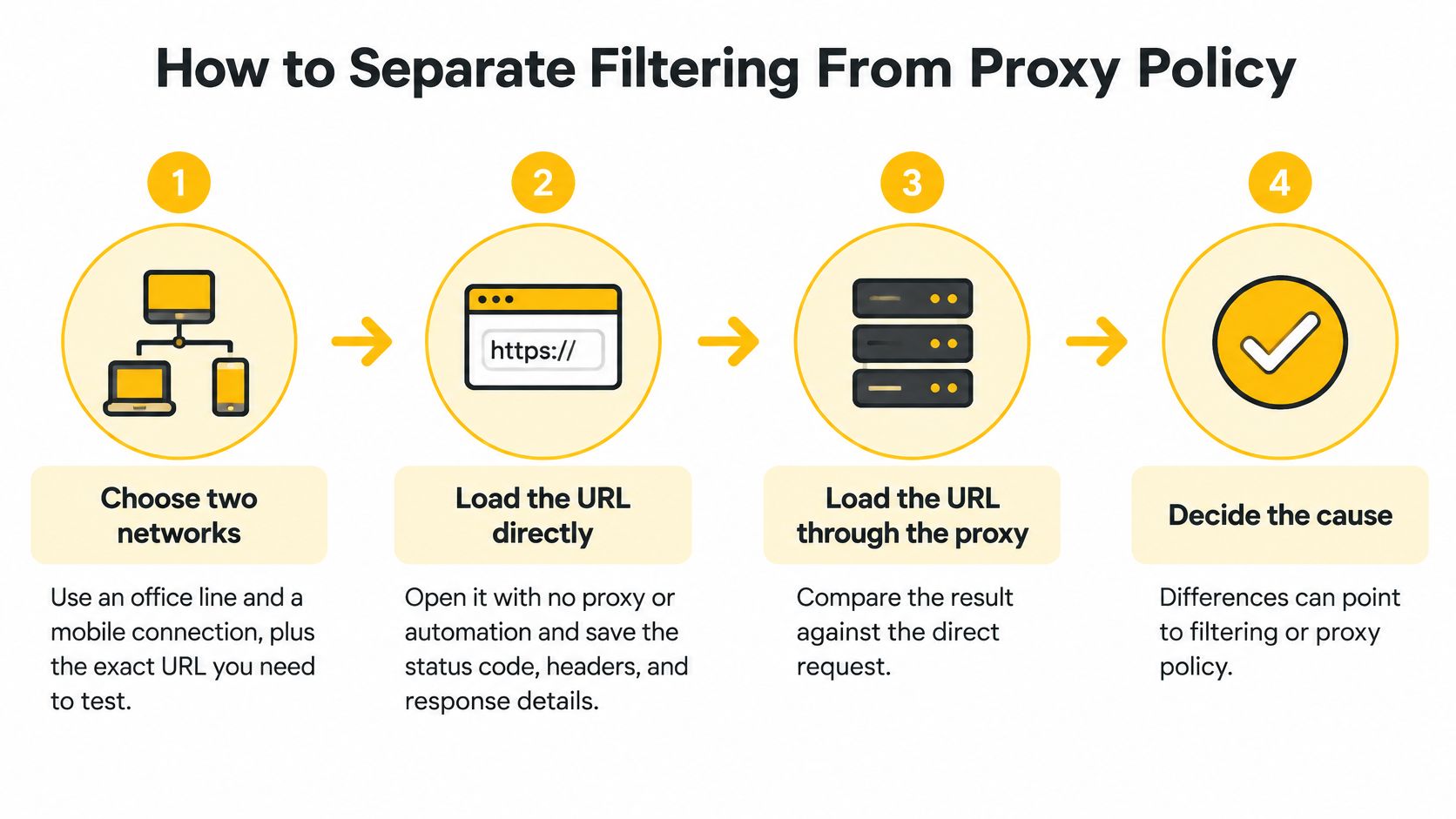
How to Separate Filtering From Proxy Policy
Keep the experiment controlled. If you change the account, browser, location, and proxy together, you won't know which change affected the result.
Capture comparable requests
- Choose your networks. Use an office line and a mobile connection with the exact URL, including its path and query parameters. Keep the device and account unchanged where practical so the network remains the meaningful difference.
- Establish the direct baseline. Open the URL without a proxy or automation, then save the response status, headers, and body. Record whether the browser displays the intended page, a login screen, or a challenge.
- Repeat through the proxy. Save the same evidence and record the configured exit location. Don't replace a full response with a screenshot of the error message alone.
- Separate connection stages. Test DNS resolution, TCP establishment, the TLS handshake, and the HTTP request independently using your client's verbose diagnostics. DNS maps names to addresses, TCP establishes the connection, and TLS negotiates its encryption.
- Inspect intermediary reporting. The standardized
Proxy-Statusfield in RFC 9209 can expose failure classes includinghttp_request_denied,destination_ip_prohibited, andconnection_refused. The first values indicate intermediary policy; connection refusal points toward the attempted upstream connection. - Compare request identity. Inspect redirects, cookies, the HTTP
Hostvalue, and SNI, the hostname presented during TLS negotiation. Unexpected differences can reveal an incorrect tunnel target or a rewritten request. - Question the block page. A recognizable logo doesn't establish who generated the response. A policy-enforcing intermediary can substitute a page that appears to come from the destination.
- Preserve the evidence. Log the timestamp with timezone, request ID, exit country, and exact response. Redact credentials and authentication tokens before sharing the capture.
Distinguish local interference from destination failure
A restriction that appears only on a particular access network deserves an ISP or gateway investigation before an IP replacement. OONI's measurements of X/Twitter in Tanzania found the platform mostly accessible on tested networks elsewhere during April–July 2025, while local ISP-level blocking explained the Tanzanian disruption.
Corporate filtering adds another variable. Purple Shield's discussion of web gateway and DNS performance trade-offs provides context when your organization routes traffic through a security gateway. Ask your network administrator whether the approved path includes filtering or inspection.
Give support a reproducible request, sanitized direct and proxy captures, the failing connection stage, and the affected network. That lets the right team investigate instead of issuing another address.
Why Mobile IPs Get Different Treatment
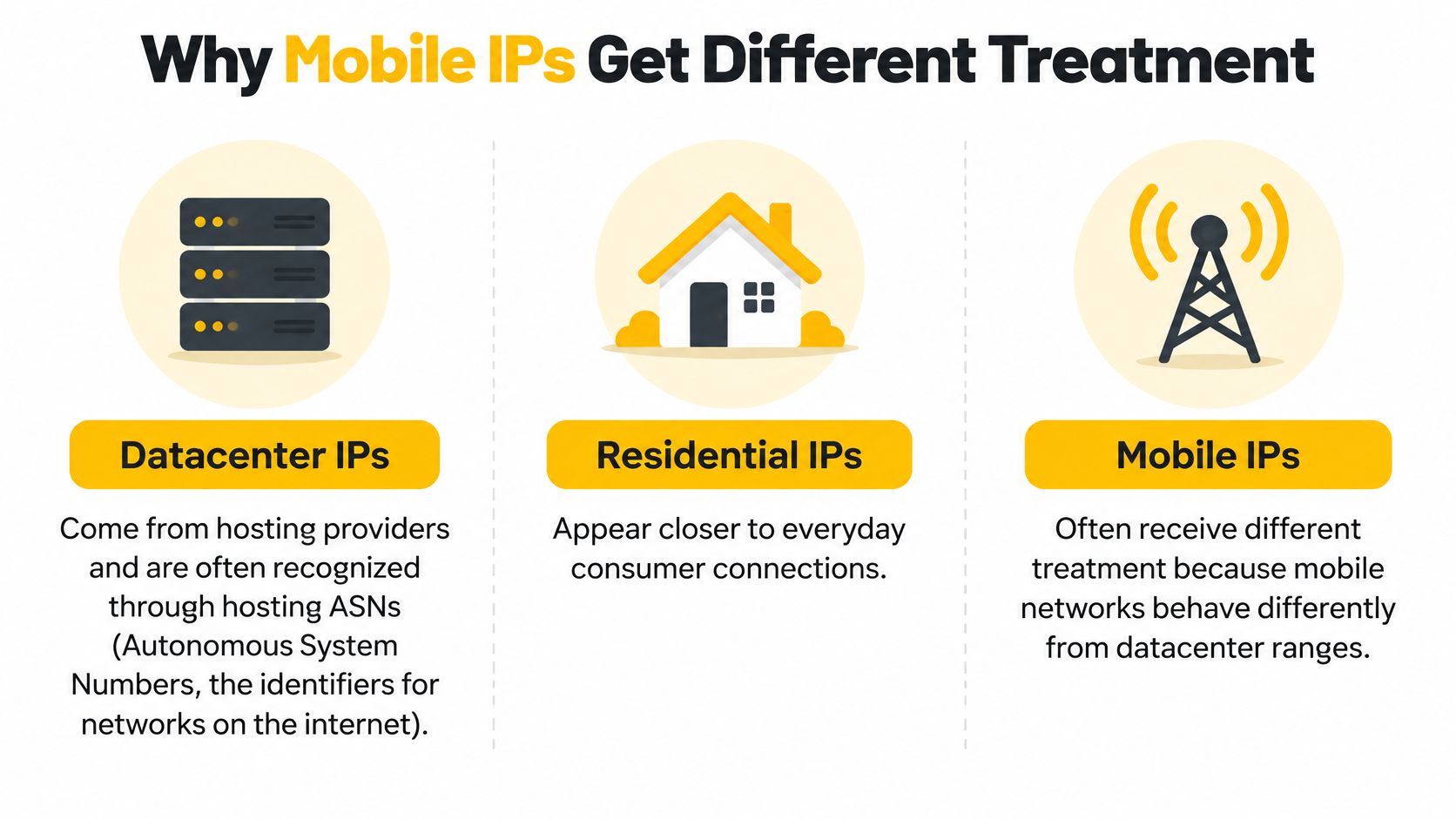
Datacenter proxies use hosting-provider addresses. Residential proxies use home ISP subscriber connections. Mobile 4G and 5G proxies use carrier networks, where public addresses often represent many subscribers rather than a single device.
Carrier-grade NAT, or CGN, is the carrier's method of sharing public addresses across customers. RFC 6598 reserves 100.64.0.0/10 as shared address space between customer equipment and carrier infrastructure; those internal addresses aren't globally routable, and the carrier translates traffic to a public address before it reaches the internet.
Compare network context, not promises of invisibility
An ASN, or Autonomous System Number, identifies a network on the internet. Hosting ASNs make many datacenter ranges straightforward to classify, whereas a carrier address alone provides weaker evidence that a request comes from automation.
Blocking a shared mobile address can also interrupt legitimate subscribers. Sites therefore have reasons to consider carrier context alongside session behavior rather than reject every request from an address.
Proxy types compared by IP source and typical classification
| Proxy type | Where the IP comes from | How sites usually classify it | Typical fit |
|---|---|---|---|
| Datacenter | Hosting provider address ranges | Often flagged by hosting ASN recognition | High-volume, low-sensitivity checks |
| Residential | Home ISP subscriber connections | Mixed classification based on device, behavior, and rate | Geo-specific price, SEO, and ad checks |
| Mobile 4G/5G | Carrier networks behind carrier-grade NAT | Carrier context weighed with behavior and session | Account-sensitive QA and mobile-site testing |
These are operational fits, not permissions. High-volume datacenter checks still require an approved workload, and residential sourcing needs clear consent and abuse controls.
Use mobile routing when the network matters
Say you're validating a localized French landing page. An approved French mobile route lets you inspect the experience presented to a customer on that network, including regional redirects and mobile-specific delivery.
That's more representative than testing exclusively from a foreign hosting network. It doesn't reproduce every customer's experience, because language settings, account history, and device characteristics can also affect the page.
Mobile IPs can be harder to classify as automation from the address alone. They are not completely undetectable, and they don't guarantee that a platform will permit automation.
Rotation, Sticky Sessions and Protocol Fit
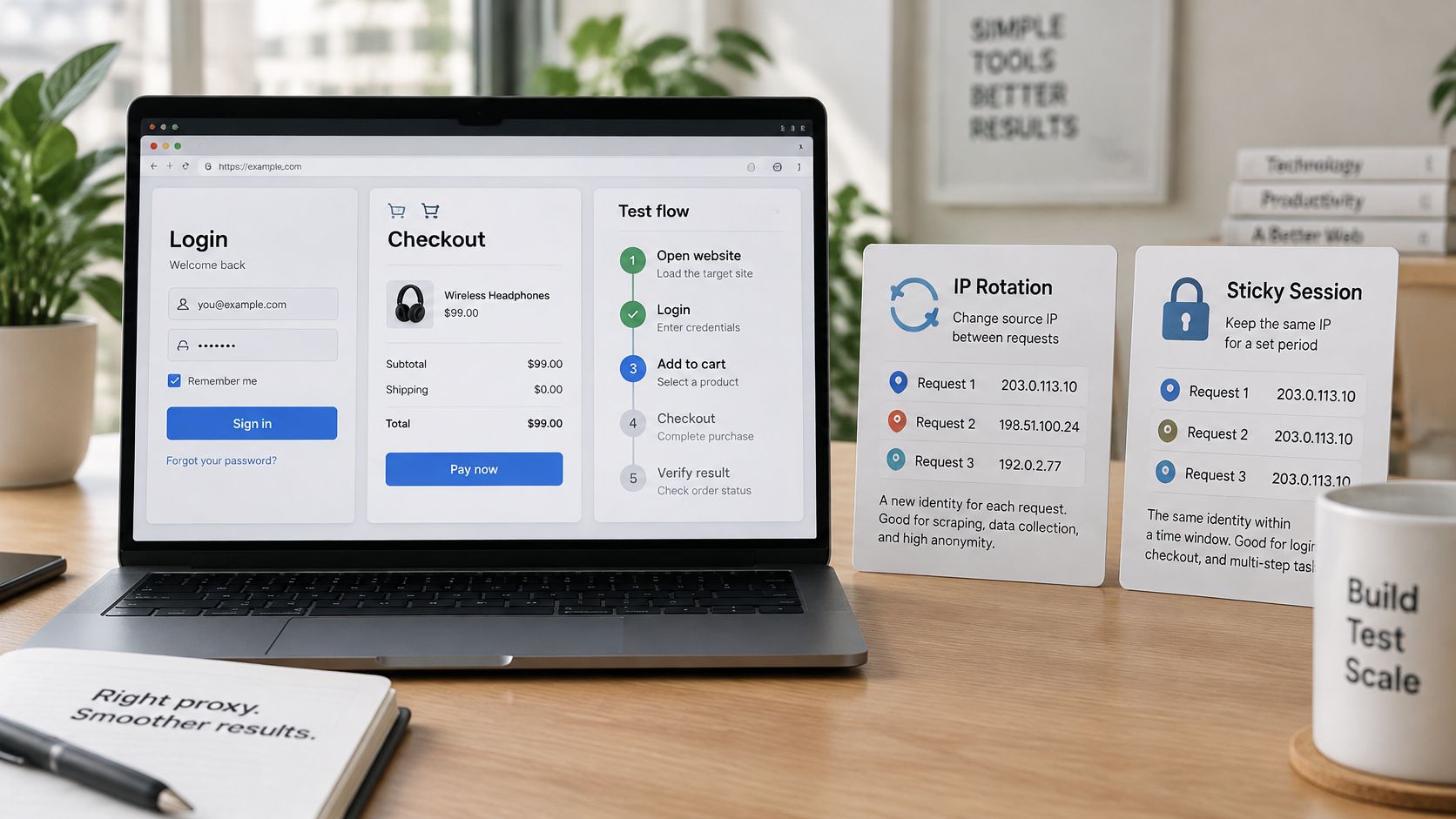
IP rotation changes the public source address between requests or jobs. A sticky session keeps a proxy identity for a defined period, which helps a stateful workflow remain coherent.
A login, checkout, or multi-step QA test shouldn't appear to jump networks halfway through. Rotate between independent jobs, such as separate market checks, rather than between dependent steps.
Match identity lifetime to the task
Sites can correlate cookies, authentication tokens, browser traits, request timing, and ASN. An address change doesn't erase those signals, and frequent changes can create an inconsistent identity pattern.
For practical session persistence, configure each workflow deliberately:
- Session identifier: Assign a stable identifier per authorized account or workflow, without sharing authenticated cookies between unrelated accounts.
- DNS routing: Confirm that name resolution follows the intended proxy path when regional DNS behavior matters.
- Client consistency: Keep the user agent and expected browser characteristics stable within the session.
- Rotation boundary: Set it around job completion and documented session behavior, not an arbitrary universal interval.
- Failure handling: Don't rotate in the middle of a transaction and blindly resubmit it. Determine whether the destination already accepted the operation.
A stable test identity usually produces more interpretable results than a constantly changing route.
Check the transport each application supports
Mozilla's proxy documentation distinguishes HTTP proxies, including HTTPS through CONNECT tunneling, from SOCKS5 proxies. An HTTP proxy is usually a straightforward fit for web requests and HTTP-aware diagnostics.
SOCKS5 can route TCP connections without interpreting HTTP semantics, making it useful for compatible applications beyond ordinary browser requests. Verify whether the client resolves destination names locally or through the SOCKS connection.
Protocol choice isn't a trust upgrade. It determines compatibility and routing behavior, not whether the destination approves the request.
Test each client separately. A browser proxy setting doesn't automatically cover a desktop application, background worker, or API process.
Remedies That Stay Within Policy and Access Rules
A block is not permission to change routes until one works. Request explicit approval for the task, such as allowlisting a test account or using an approved API. For monitoring or testing, describe the intended workload so the site owner can decide what access is appropriate.
Ask for a defined access arrangement
Include these details in your request:
- Responsible owner: Name the account or API-key owner and a technical contact who can pause the job.
- Business purpose: Explain whether the work involves ad verification, brand monitoring, checkout testing, or permitted market research.
- Request scope: List the URLs or endpoints and the actions the job performs.
- Load envelope: State expected volume, request rate, concurrency, and schedule.
- Access boundaries: Identify test accounts, required permissions, and data-handling restrictions.
While approval is pending, reduce load on the destination. Cap concurrency, spread requests over time rather than across addresses, and honor Retry-After, the response header that specifies when a client should retry.
Pause when a challenge appears. Do not automatically escalate retries. Keep cookies stable within a session, and configure each browser or API client to use headers and TLS behavior appropriate to that client. Do not impersonate another client to defeat a control.
Understand why another IP may not help
The OWASP Bot Management and Anti-Automation Cheat Sheet recommends layered defenses and cautions against relying on IP blocking alone. Distributed traffic can stay below per-IP thresholds, so defenses may also account for short bursts and sustained low-rate activity.
A WAF, or web application firewall, can reject a valid address based on request content, session state, behavior, or a client fingerprint. A fingerprint is a recognizable combination of connection and application characteristics, not just an IP reputation label.
Access boundary: Mobile proxies are not intended for evading detection or bypassing access controls.
Use proxies only for authorized work, such as QA, monitoring, or account operations permitted by the platform. Check the compliance requirements alongside account permissions and owner approvals. If the platform or site owner refuses access, stop the job rather than trying another route.
Pick the Compliant Route for Your Use Case
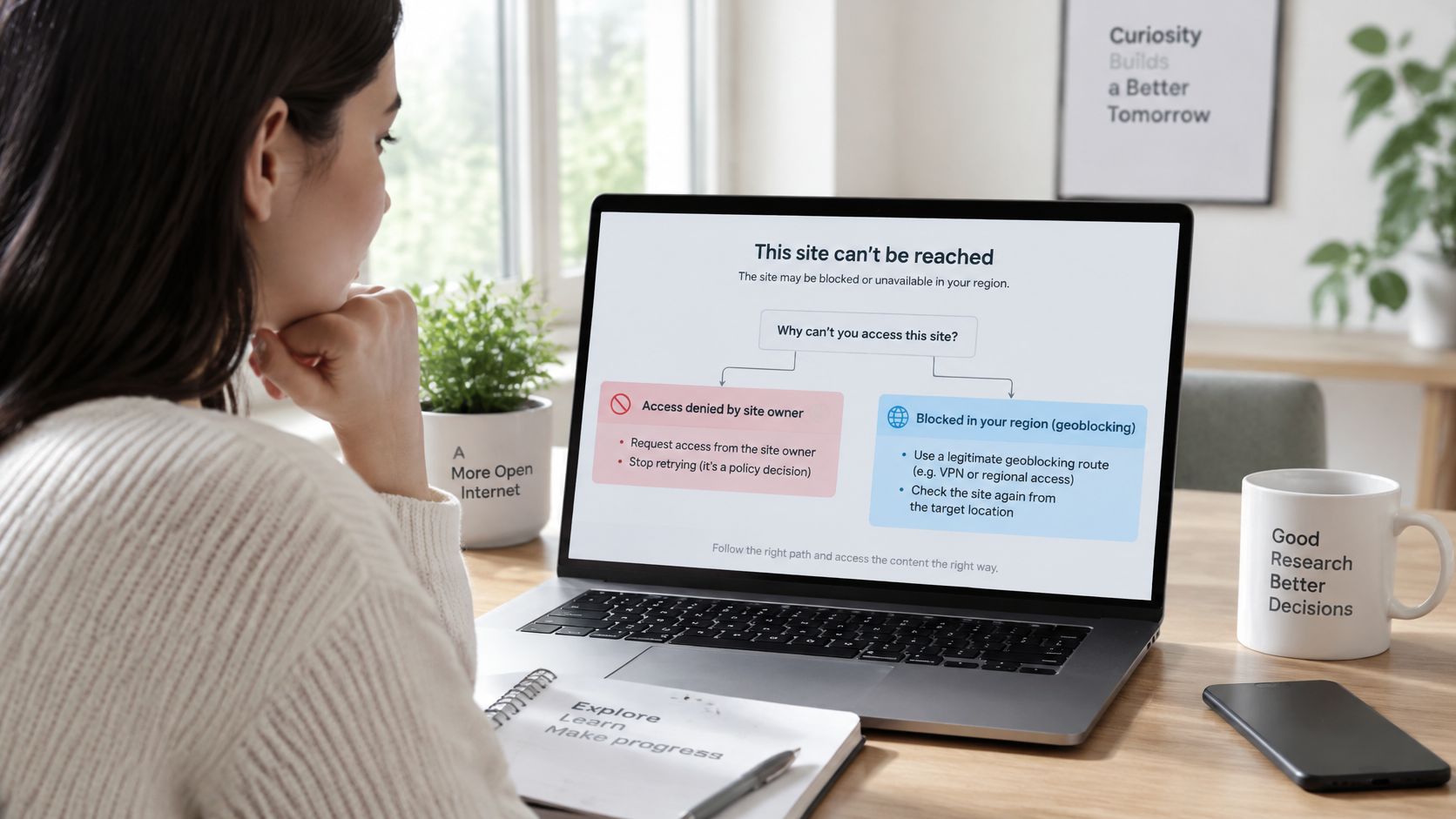
Choose a route after diagnosing the failure. Your goal is an authorized result that reflects the customer experience. Changing IPs before identifying the cause can make a behavior-based block worse.
A policy denial requires permission from the site owner. A geographic mismatch calls for approved testing from the intended market. If the issue points to reputation or behavior scoring, correct the workload before trying another network route.
Match the route to the business task
| Legitimate task | Route and operating requirement | What to validate |
|---|---|---|
| Multi-account social management | Approved account access with sticky sessions and account-level allowlisting where available | Each account has permission and a consistent operational identity |
| Ad verification and regional research | Geo-specific routes matching the campaign market | Placement, destination, language, and regional redirects |
| Price and SEO monitoring | Rate-limited HTTP access within the site's rules | Comparable page variants and an acceptable request schedule |
| Location-dependent QA | Approved routing through the target market | The complete localized user flow |
| Brand protection | Bounded monitoring of permitted public material | Coverage without collecting unnecessary personal information |
For a French checkout test, use an authorized test account, route through the intended French network, and keep the transaction in its assigned session. Validate shipping choices, currency display, and payment-test behavior without placing an unintended live order.
Retail monitoring has the same limits: permission to inspect public prices does not grant permission to evade purchase limits, queue controls, or account restrictions.
Define success before evaluating a connection
Set acceptance criteria before testing: the expected page, the correct regional experience, a completed workflow, and a reproducible diagnostic record. A response that contains a challenge page does not pass.
Keep the evaluation tied to the authorized workflow. Check its session and geographic requirements rather than treating access to an unrelated homepage as proof that the task will work.
Evoproxy offers mobile 4G/LTE/3G ports from France for controlled tasks such as authorized QA, ad verification, regional research, and account operations within platform rules. Visit Evoproxy to evaluate a mobile proxy configuration against your approved workflow before committing.