
The Maximum Transmission Unit (MTU) is the largest packet size a network link can carry without fragmentation, and the standard default for most internet traffic is 1,500 bytes. In practical terms, the MTU setting determines how much data your interface can place in one packet before the network must split or discard it.
You can have a healthy proxy connection, rotating IPs, and a responsive automation dashboard, yet still see individual pages fail, uploads stall, or login sessions disappear. The cause is often a packet-size mismatch between a high-MTU datacenter or VPN segment and a lower-MTU mobile path. Your scraper isn't necessarily slow. It may be sending packets that a hidden link can't carry.
Why Your Scraper Fails Even When the Connection Looks Fine
A scraping job can pass its health check and still fail on real work. The proxy authenticates, the target responds, and the first page loads. Then a larger response, a form submission, or a media-heavy request hangs while other destinations continue working.
That pattern misleads teams because the obvious indicators look normal. DNS works, the socket opens, and IP rotation behaves as expected. The failure appears destination-specific or session-specific, but the underlying problem can be a packet that exceeds the smallest MTU somewhere between your worker, proxy, carrier network, and target.
Practical rule: If small requests work but larger transfers stall, investigate packet size before blaming bandwidth or proxy rotation.
This matters across legitimate workflows. A social media team may load a profile but fail during account setup. An ad verification process may retrieve the page shell but miss a script or tracking response. Price monitoring may collect some product pages while timing out on a particular region or checkout flow.
The same proxy can therefore appear reliable in one test and unstable in production. A datacenter path may support larger packets locally, while a VPN tunnel or mobile cellular route imposes a smaller limit. If the sender doesn't learn about that limit, oversized packets may be fragmented, dropped, or repeatedly retransmitted.
The practical question behind what is an MTU setting isn't just “what number should I enter?” It's whether the packet size remains safe across the entire route your automation uses.
Defining the MTU Setting and Its Core Function
An MTU setting is the maximum packet size an interface can transmit across a link without fragmentation. The setting belongs to a network interface, so your laptop, proxy host, VPN adapter, container, router, and cellular gateway can all have different limits.
In standard Ethernet, the widely adopted MTU is 1,500 bytes. That number describes the payload carried by the Ethernet frame, not the complete frame on the wire. A standard Ethernet II frame totals 1,518 bytes, combining the 1,500-byte payload with 14 bytes of header and 4 bytes of frame check sequence overhead, as documented in AWS's explanation of network MTU.
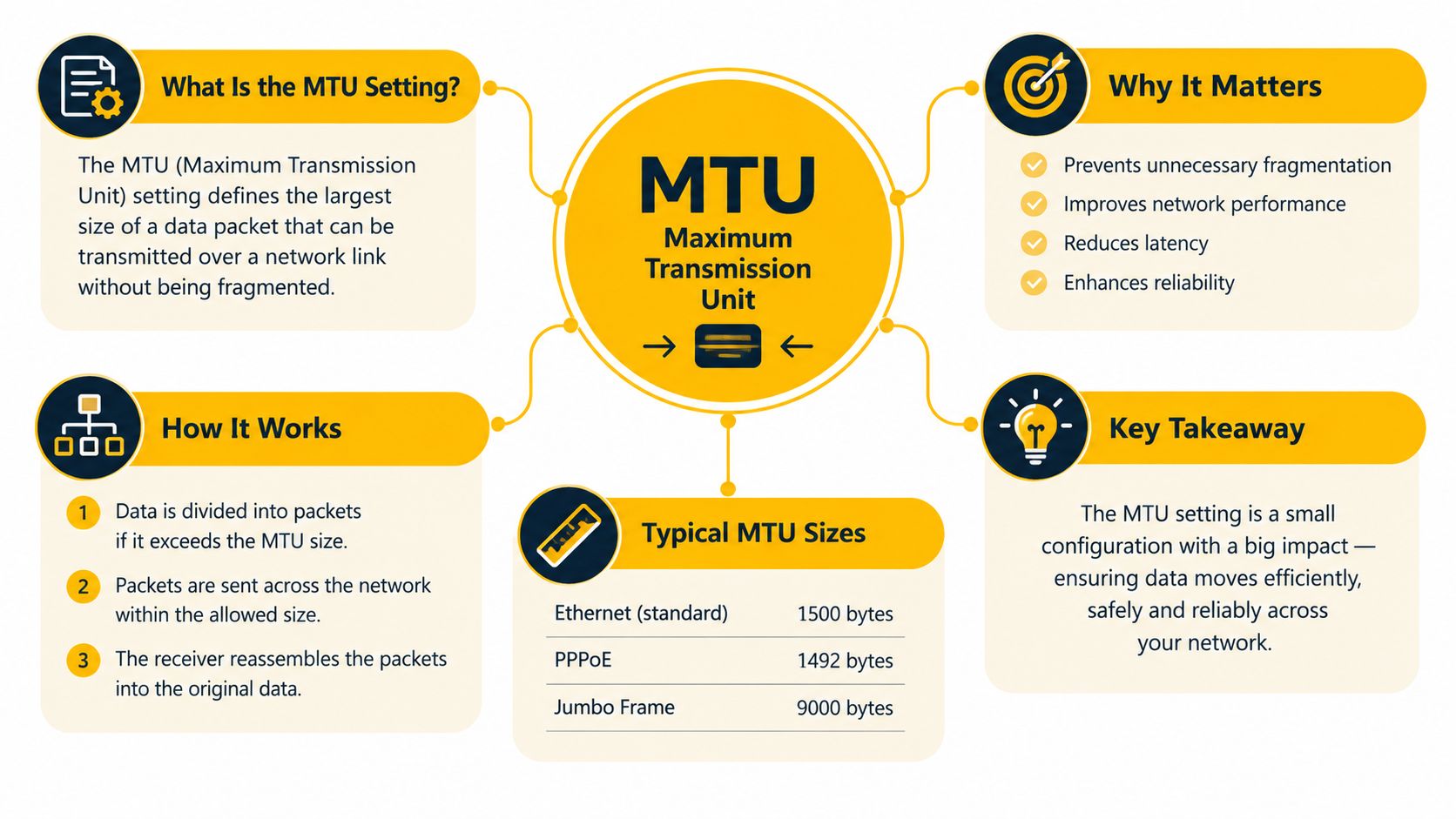
What happens when data reaches the limit
Your application creates data. Transport protocols such as TCP or UDP wrap that data, IP adds its header, and the interface places the resulting packet into a frame. The MTU sets the ceiling for the packet carried over that link.
For a standard Ethernet path, a 1,500-byte MTU leaves 1,460 bytes for TCP payload, after accounting for a 20-byte IP header and a 20-byte TCP header, according to Cisco's MTU and TCP MSS guidance. If a packet is too large for the outgoing interface, the network must either fragment it or drop it, depending on the protocol and configuration.
That distinction gives you useful troubleshooting vocabulary:
- Interface MTU: The largest packet a specific interface can carry without fragmentation.
- Path MTU: The largest packet that can cross the complete route safely.
- Fragmentation: Splitting one oversized packet into smaller pieces.
- MSS: The TCP payload limit negotiated between endpoints.
The default survives because it offers broad compatibility across internet access networks. Larger frames can be efficient on a controlled internal network, but they become risky when a tunnel, carrier link, firewall, or intermediary device supports less.
How MTU Impacts Latency, Throughput, and Fragmentation
MTU affects performance through packet count and failure handling. Larger packets carry more payload per transmission, so they generally reduce protocol overhead and the number of packets your system must process. Smaller packets are easier to fit through constrained paths, but they use bandwidth less efficiently.
A mismatch creates the worst outcome. Alibaba Cloud's MTU guidance gives a clear example: a 2,000-byte packet crossing a 1,500-byte MTU link is split into 1,500-byte and 500-byte fragments. The receiver must reassemble those pieces, and a lost fragment can force retransmission of the affected data.
Why fragmentation hurts automation
Fragmentation adds work at multiple points:
- The sender or router divides the packet.
- The network carries multiple fragments instead of one packet.
- The receiver tracks and reassembles the fragments.
- A missing fragment can delay delivery or trigger retransmission.
That extra processing can raise latency and reduce effective throughput. It also creates more opportunities for a firewall, NAT device, or carrier gateway to mishandle traffic. A scraper may still report an open connection while the application waits for a fragment that never arrives.
The opposite mistake is setting packets too small everywhere. Small packets avoid many path-limit problems, but they increase packet count and reduce payload efficiency. That can consume more CPU and create unnecessary protocol overhead, especially for sustained transfers.
Tune for the path, not the fastest interface
A high-MTU datacenter interface doesn't make a mobile route high-MTU. A VPN can add encapsulation overhead, and a cellular carrier can impose a lower effective limit. The useful target is the largest packet size that stays below every relevant link limit.
Measure latency alongside packet behavior, not instead of it. A practical latency measurement workflow can show whether a change reduces delay, but a clean latency result alone doesn't prove that larger packets traverse the route reliably.
For automation, avoid changing MTU just to chase a theoretical throughput gain. First identify whether failures correlate with larger responses, uploads, or tunneled traffic. If they do, a conservative, consistently tested MTU usually beats an aggressive value that works only on the local segment.
Understanding Path MTU Discovery and Common Defaults
The local interface only knows its own limit. Path MTU Discovery, or PMTUD, determines the largest packet that can travel from the sender to a particular destination without fragmentation. That value can change when the route changes, so it isn't a universal property of the machine or proxy.
RFC 8201 describes PMTU as tied to a specific path and states that the initial PMTU is assumed to be the MTU of the first-hop link. RFC 4821 explains that when useful ICMP feedback isn't available, endpoints can probe with successively larger packets to discover a working size.
Interface MTU versus path MTU
Consider a worker host with a local interface configured for 1,500 bytes. Its request enters a VPN, crosses a proxy gateway, travels through a carrier network, and reaches a destination. The safe packet size is governed by the smallest effective limit along that route.
The reverse situation is more dangerous for proxy operations. A host or datacenter segment may support a larger packet, but a tunnel or mobile access path may not. Increasing the local value doesn't increase the capacity of the remote path. It can instead produce fragmentation or silent loss when the packet reaches the constrained hop.
Jumbo frames belong to controlled environments where every device supports the same larger frame size. They aren't a sensible default for a route that includes public internet paths, third-party tunnels, or changing cellular infrastructure.
Why PMTUD can appear inconsistent
PMTUD relies on endpoints and network devices communicating about packet limits. If feedback is blocked or lost, the sender may continue using an unsuitable size. The result is a connection that establishes successfully but stalls once the application sends larger payloads.
Use separate tests for:
- Local interface capacity, which confirms the configured MTU.
- Path capacity, which tests packets across the actual route.
- Application behavior, which confirms that the proxy and target handle larger transfers.
A working small ping doesn't clear the path. It only proves that a small packet made the trip. For scraping, the relevant test is whether the request and response patterns used by the job remain below the path's effective limit.
Mobile Proxies, CGNAT, and Unique Networking Constraints
A scraper can work reliably through a datacenter proxy, then stall on a mobile exit even when both connections appear healthy. The difference is often the path's effective MTU, not the proxy's response time.
A datacenter proxy typically uses infrastructure with predictable interfaces and controlled local networking. A residential proxy exits through a household or fixed access connection, so the access provider and local router shape the route. A mobile proxy uses a 4G or 5G cellular connection, with carrier routing and NAT between the proxy device and the public internet.
Mobile proxies commonly operate behind carrier-grade NAT, or CGNAT. Many subscribers share a smaller pool of public IPv4 addresses. The shared design can also introduce extra forwarding layers and route variation, so the public address alone does not describe the network path.
Why the proxy type changes the MTU problem
A datacenter or VPN link may support a familiar Ethernet MTU. A mobile path can have a lower effective limit because traffic crosses radio access infrastructure, carrier networks, NAT, and sometimes a tunnel before reaching the target. Encapsulation consumes header space. Packets that fit on the originating link can therefore exceed the mobile path's limit.
The failure may be silent. A connection can establish, small requests can succeed, and larger responses can stall when path MTU feedback is blocked or a packet is discarded. Test the complete route rather than copying a datacenter interface value into a mobile or VPN configuration. A path using LTE connectivity can remain usable while requiring a smaller safe packet size.
Transport and targeting choices
The transport choice matters because added encapsulation reduces the payload available to the application. SOCKS5 can carry traffic beyond ordinary web requests, so its traffic profile may expose MTU problems that a simple browser request does not. Account for the proxy layer, VPN overhead, and any other tunnel when testing packet size.
Targeting can change the route. Country, city, or ASN selection may place a request on another carrier or access network. An ASN, or autonomous system number, identifies a network operator's routing domain. Two targets with the same country setting can still use different paths and show different MTU behavior.
Keep IP rotation separate from packet testing. Rotation changes the exit identity and may change the route, while a sticky session keeps related requests on one proxy identity for a defined workflow. For account management, ad verification, or geo-dependent QA, consistent routing often matters more than changing identity on every request. Test session behavior and path stability together.
How to Check and Change MTU on Major Operating Systems
Start by checking the interface that carries the traffic. A local value is evidence about one link, not proof of the path limit.
Windows
Open a terminal with administrator privileges and display interface values:
netsh interface ipv4 show subinterfaces
You can also inspect adapter details with:
ipconfig /all
For a temporary adjustment, use the interface name shown by the first command:
netsh interface ipv4 set subinterface "Interface Name" mtu=1500 store=active
Change the value only after testing. Avoid registry edits for routine MTU work, because the active interface and route may not be the one you think they are.
macOS
List interfaces and their current settings:
ifconfig
For a temporary change, replace en0 with the interface carrying the route:
sudo ifconfig en0 mtu 1500
The setting may reset after a network change or reboot, so use the operating system's network configuration if you need persistence.
Linux
Inspect interfaces with:
ip link show
Test a temporary value:
sudo ip link set dev eth0 mtu 1500
For persistent configuration, use the distribution's network manager or declarative network configuration. Don't change only the physical interface if a VPN, container bridge, or virtual interface carries the automation traffic.
Test progressively rather than making a large jump. The correct value is the minimum effective limit along the route, and a higher local MTU can still fail at a smaller intermediary link. Cisco's MTU configuration guidance emphasizes this distinction between per-interface MTU and path MTU.
Troubleshooting Symptoms and Best Practices for Automation
MTU faults tend to be selective. A connection may authenticate, load a small document, and then fail when the response or upload becomes larger. Look for:
- Partial page loads: HTML arrives, but scripts, images, or API responses stall.
- Session drops: Login or upload workflows fail after initial negotiation.
- Destination-specific errors: One site fails while another works through the same local interface.
- Inconsistent rotation results: Some proxy exits complete a job, while others time out because their paths differ.
- VPN-only failures: Direct traffic works, but encapsulated traffic breaks under load.
A packet larger than the egress MTU can be dropped even when the local interface appears correctly configured. The source may be told to lower its path MTU, but if that feedback doesn't reach the sender, the application can keep retransmitting an unsuitable packet size, as explained in path MTU discovery guidance.
A practical operating checklist
- Capture the route. Test the worker, tunnel, proxy type, target region, and destination together.
- Compare proxy categories. Don't assume a datacenter result predicts residential or mobile behavior.
- Preserve sessions where needed. Use sticky sessions for multi-step workflows, then test rotation separately.
- Check transport. Compare HTTP/S traffic with SOCKS5 when the application supports both.
- Test larger payloads. Small requests can pass while bulk responses fail.
- Lower cautiously. Reduce the interface or tunnel MTU in controlled steps, then retest the exact job.
- Monitor stability. Review network stability practices alongside latency, timeouts, retransmissions, and application errors.
- Keep compliance in scope. Use automation for authorized research, account management, ad verification, price monitoring, brand protection, and QA, and follow each platform's rules.
The best configuration isn't the largest number on one interface. It's the largest safe value that works consistently across the entire route your business process depends on.
Evoproxy provides mobile 4G, LTE, and 3G proxy connectivity for teams running compliant social media management, ad verification, market research, geo-dependent QA, and monitoring workflows. Visit Evoproxy to test a mobile route and evaluate how its carrier path behaves with your sessions, payloads, and MTU requirements.


