
Deleting Chrome history doesn't create a fully isolated or anonymous session. It removes records of visited pages, but cookies and site data can preserve logins and identifiers, cache can retain local resources, and autofill or downloads are separate categories. A proxy changes the network route and apparent IP address. It doesn't automatically alter browser fingerprint signals such as WebGL, WebRTC behavior, screen characteristics, or installed-language patterns.
That distinction matters for social media managers, QA teams, ad-verification specialists, market researchers, resellers, and growth marketers. A Chrome history cleaner extension can reset browser state, but it can't authorize automation, rotate an IP by itself, or make a browser profile indistinguishable from another one. The seven resources below are therefore evaluated by the signals they control, their permissions and operational risks, and how they fit with Chrome profiles, sticky sessions, mobile, residential, or datacenter proxies in legitimate workflows.
1. Clear Cache, Cookies and Browsing Data on Exit
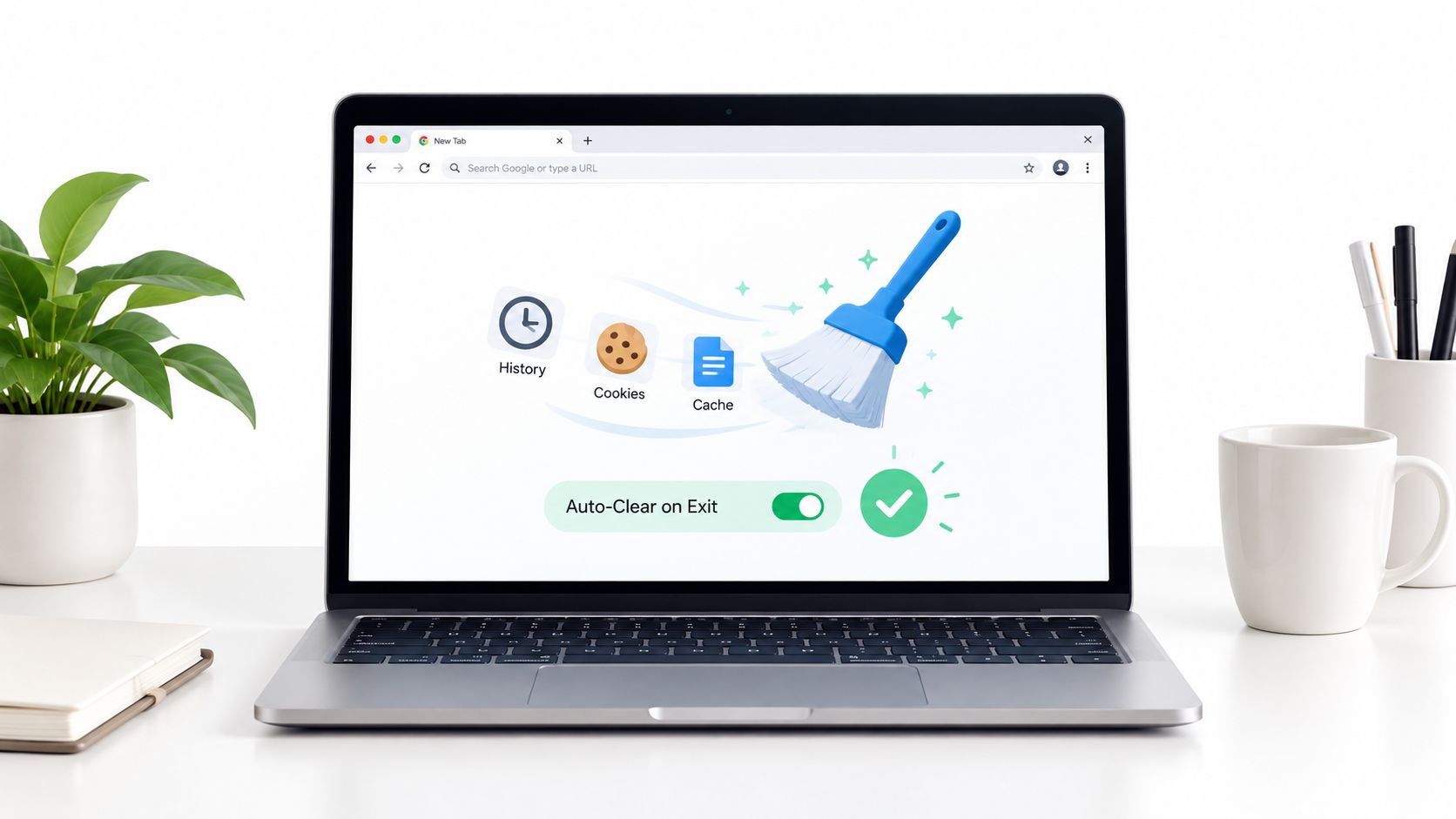
An exit-cleaning extension is the most direct choice for routine session resets. Depending on its configuration, it can remove browsing history, cache, cookies, and site data when Chrome closes or at a selected interval. That makes it useful when a team wants each test to begin with a known browser state, but the scope must be checked carefully because clearing cookies can sign users out and remove site preferences.
Chrome's official workflow already separates browsing history from cookies, cached files, saved form entries, and other categories. Users can select a time range such as “Last hour” or “All time,” while signed-in Chrome users should also understand that synchronized browsing-history deletion can affect connected devices through the same account, as Google's desktop guidance explains.
Where it fits
A PPC QA team can clear stale cache and site data before checking a geo-dependent landing page. An SMM agency can assign separate Chrome profiles to separate client workflows, then apply different exit rules instead of wiping the profile used for internal analytics.
Pair the cleanup policy with a sticky proxy session, meaning the same proxy endpoint remains assigned for a defined period. That keeps navigation consistent while the extension removes stale browser artifacts. The proxy configuration itself should be documented separately from the cleanup rule. Teams can use this guide to configuring a proxy with Chrome as a starting point, then test whether the workflow depends on persistent cookies.
Practical rule: Clear only what the next test must not inherit. Preserving required cookies is often safer than treating every session as disposable.
The extension controls local browser state. It doesn't rotate an IP, change the proxy's ASN, or hide fingerprint signals. A mobile 4G or 5G proxy routes requests through a carrier network, while a residential proxy uses a residential connection and a datacenter proxy uses hosting infrastructure. Those network choices remain independent of exit cleanup.
2. History Eraser by Comodo
Comodo's tool goes one category deeper than a standard history wipe. It targets browsing history, temporary files, Flash cookies, and application caches, which matters in test environments where residual local state can survive after someone clicks Chrome's usual clear-data controls. For teams running repeat checks on the same workstation, that extra scope is more useful for cleanup discipline than for privacy theater.
The operational value is narrow but real. A team can define what should be removed between runs and keep that rule consistent, instead of relying on each operator's idea of what "clean" means. That is helpful in sensitive QA cycles where the goal is to document exactly which browser-side artifacts were cleared before the next test starts.
The boundaries are just as important. Deleting deeper browser and workstation remnants does not change canvas, WebGL, WebRTC, language settings, device traits, or other fingerprint signals. It also does not change how a service sees the network source. If a workflow needs stricter session isolation than cleanup alone provides, use separate profiles and review this guide to stealth browsing in Chrome. Then decide separately whether the route should use sticky, rotating, mobile, residential, or datacenter proxies.
A media-buying team testing regional campaigns might use selective cleanup between controlled runs, keeping the cookies needed for one approved workflow while removing temporary data that can distort a fresh test. A research team can schedule deletion outside active work hours, then verify the selected categories disappeared. "Clear history" is too imprecise for audit-friendly work.
Operational controls
Use a written cleanup profile for each workflow. One profile can remove history and temporary data after a test. Another can preserve application state for an internal dashboard that depends on ongoing authentication.
- Schedule carefully: Run deletion only when no active test depends on the current browser session.
- Record the scope: Note whether history, cookies, caches, downloads, or application data were selected.
- Test older integrations: Flash-cookie removal can affect legacy players or older advertising systems.
- Verify after deletion: Reopen relevant pages and confirm that the intended state changed.
Chrome extensions reach sensitive data through declared permissions. Google's History API documentation shows that an extension needs the history permission to query, add, or remove visited URL records. Review the manifest and privacy disclosure before deployment, especially in managed environments where deletion actions should match a documented business purpose.
3. HistoryBlocker Advanced Cleaning and Privacy
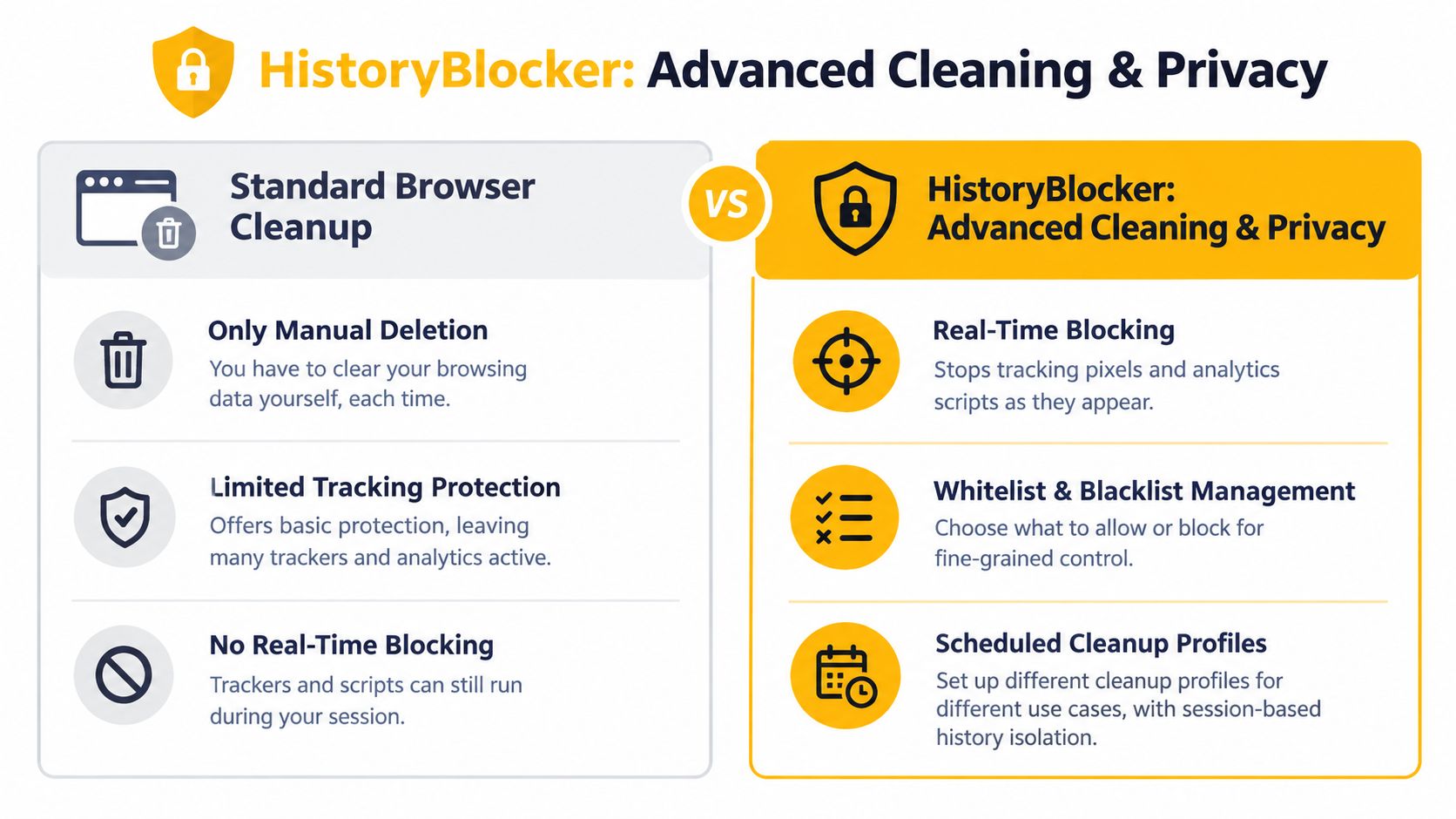
A history cleaner matters less for what it deletes after a session than for what it prevents a profile from collecting during the session. That is the useful angle for HistoryBlocker. If it combines real-time blocking with scheduled cleanup and session-level separation, the extension affects browser state at two points: data creation and data removal. That can reduce residue between approved workflows, but it can also change the environment under test.
The risk is operational, not theoretical. Blocking trackers or related page elements may stop analytics calls, alter attribution paths, suppress consent flows, or change which scripts load at all. A clean result from a blocking profile is only a clean result for that modified browser state. Teams that treat it as representative of normal user behavior can misread conversion issues, regional rendering differences, or account friction that appears only when standard tracking runs.
A better way to use HistoryBlocker is to map it to the signals it controls. It can affect local browser records such as history, cookies, cache, and other stored data, depending on its permissions and settings. It does not set the network route. It does not rotate an IP. It does not remove server-side account history. It also does not guarantee control over fingerprint signals unless the extension explicitly includes those features, which this section does not assume.
That separation helps in compliant workflows. An agency switching among approved regional accounts might keep one restrictive browser profile for short account changes and another for internal tools that need persistent authentication. A testing team running location-sensitive checks can pair local cleanup with a sticky session if the goal is a stable network identity across repeated runs. IP rotation serves a different purpose. It changes the address used for requests. Cleanup only changes browser-side state.
Instead of giving each operator a personal blacklist, keep a small set of reviewed configurations with a written purpose:
- Restrictive profile: for disposable tests where stored tracking state would bias the result.
- Permissive profile: for dashboards, analytics validation, or workflows that need continuity.
- Change control: review blocked elements and permissions before updating shared rules.
- Run logging: record which profile was used so teams can explain differences in outcomes.
The practical selection criteria are narrower than the product label suggests. Check what categories the extension can block or delete, what permissions it requests, how deletions are triggered, and whether those controls fit a documented business workflow rather than an assumption that "privacy" covers every browser and network signal.
4. Privacy Cleaner Pro
Privacy Cleaner Pro is positioned as a premium tool that combines one-click deletion with controls for browser-level fingerprint signals, including canvas, WebGL, and WebRTC. That makes it conceptually broader than a history cleaner. It addresses both reactive cleanup, which removes stored data, and proactive signal control, which changes or restricts what sites can observe during a session.
The distinction is especially important for geo-dependent QA. A proxy can provide a French network route, but a browser may still expose characteristics that don't match the intended test environment. WebRTC leak controls can help prevent unintended local-network exposure, while WebGL controls can alter graphics-related signals. Neither should be described as proof that geolocation will rely only on the proxy IP.
Test for breakage, not just privacy
Fingerprint controls can affect legitimate browser functions. Graphics-heavy interfaces, video calls, interactive maps, and fraud-prevention systems may behave differently when WebGL or WebRTC is restricted. A QA team should record the browser profile, proxy route, protocol, and enabled protections for every test.
Use separate Chrome profiles for separate clients or test environments. Don't rely on a single profile with repeated identity changes, because profile storage and account state can create confusion even when history is deleted.
A cleaner can reduce local correlation signals. It can't make an unauthorized account operation compliant, and it can't erase records held by a service or account provider.
The extension also needs a permission review. The USENIX research cited in the evidence base found limited user understanding of browser-extension capabilities among surveyed participants, and separate large-scale research identified extensions that leaked browsing or search history. Those findings support a conservative deployment model: request only necessary permissions, prefer local processing, disable unnecessary analytics, and verify the developer's data-handling claims.
For legitimate ad verification or regional QA, combine a stable test profile with a deliberately selected proxy route. Choose a mobile proxy when the workflow needs a carrier-network source, residential routing when a residential connection is the requirement, or datacenter routing when controlled infrastructure and predictable performance matter more than consumer-network resemblance.
5. Click and Clean Browser Cleaning and Security
Click&Clean is more useful as a local control surface than as a privacy solution. Its value is practical: a team can remove browser-resident data, inspect temporary files, and add a security check around downloaded assets. That scope matters for campaign work, but it also changes the risk profile. A tool that touches browsing data, files, and security settings deserves a tighter permission review than a cleaner that only deletes history.
The operational question is simple. Which signals does it control? Click&Clean can affect local browser state such as history, cache, cookies, and other stored traces on the machine. It does not rotate IPs, stabilize a session across networks, or change how a destination evaluates ASN type, proxy route, or other network-level context. Teams that need a sticky mobile session, a residential route, or controlled datacenter egress still need to choose that separately and document why that route fits the approved workflow.
A paid media or affiliate QA team may have a legitimate reason to clear local traces after reviewing regional landing pages or downloading creative for inspection. The safer pattern is selective cleanup, not broad deletion. Preserve screenshots, logs, exported HAR files, and any artifacts needed for audit, dispute resolution, or debugging. Cleanup should reduce leftover browser state, not erase evidence that a test happened.
Security scanning belongs in the same workflow, but as a separate checkpoint.
Use it this way:
- Before opening downloads: scan unfamiliar assets and isolate them from the production workspace until reviewed.
- After a test session: clear only the browser categories relevant to the scenario, then verify what changed in that Chrome profile.
- For storage hygiene: remove temporary or duplicate files deliberately, without auto-deleting items tied to campaign records.
- For account separation: keep dedicated Chrome profiles for each client, market, or test environment.
This makes Click&Clean a better fit for analysts and operators who want visible, manual actions. It is a weaker fit where a business needs centrally enforced browser policy across many endpoints, unless administrators can govern settings through existing device controls.
The trade-off is easy to miss. Combining cleanup and security features in one extension can reduce tool sprawl, but it also concentrates permissions. Review what data the extension can access, whether processing stays local, and whether its settings support controlled use rather than habitual wiping.
Use cleanup only for approved testing and ordinary workstation hygiene. It does nothing to legitimize scraping, account abuse, or access that breaks platform rules. Google's spam-policy documentation makes that distinction clear. Permission, rate control, approved accounts, and allowed endpoints still determine whether the workflow is compliant.
6. Browsec VPN with History Cleaner Integration
A VPN plus a Chrome history cleaner extension can look like a privacy stack, but the controls sit at different layers and solve different problems. One changes the network path and encrypts traffic between the device and the VPN service. The other removes browser-state artifacts such as history, cookies, cache, or site data. That combination can make sense for routine privacy on hotel or airport Wi-Fi. It does not, by itself, produce a clean browser identity, a stable test session, or a market-accurate connection for verification work.
That distinction matters in business workflows.
A distributed social team, for example, might use the VPN while traveling to reach internal systems over an untrusted connection, then switch to an approved mobile or residential proxy for a regional campaign check. Keeping those routes separate usually makes diagnosis easier. If a login breaks, the team can tell whether the problem came from session data, the chosen IP context, or the application itself, instead of guessing across multiple stacked layers.
The more useful question is not whether the bundle includes cleanup and VPN features. It is which signals each part controls, what permissions it requires, and what risk follows from turning both on at once. A cleaner affects browser storage. A VPN affects transport and visible routing. Neither one standardizes browser fingerprinting signals such as fonts, extensions, canvas behavior, timezone mismatches, or profile age.
Running a VPN and a proxy in the same session can still be valid, but only with a documented reason. Otherwise, teams add routing ambiguity, speed variation, and location confusion without gaining a clear testing benefit. Before a QA run, decide which layer owns geography, verify session persistence requirements, and test for local exposure with a documented WebRTC leak prevention guide.
IP type also changes the context that a destination sees. ASN, or Autonomous System Number, indicates which network announces the address range. A mobile IP often sits within a carrier ASN and may use carrier-grade NAT, where many subscribers share public addresses. Residential and datacenter addresses create different expectations, so IP rotation should be treated as a route choice, not a universal privacy fix.
For compliant use, align the route with the job. Use sticky sessions where login continuity matters. Rotate only when the test requires a new network condition. Keep the browser profile, cookies, route, and geography consistent, and use cleanup for approved hygiene rather than as a substitute for policy, permission, or proper account separation.
7. CCleaner Browser with Native History Cleaning
A native cleanup browser changes the control point. Instead of relying on each operator to install and maintain a separate Chrome history cleaner extension, teams can standardize browser settings, profile rules, and exit behavior at the browser level. That reduces extension conflicts and makes policy enforcement easier to audit.
The main benefit is operational consistency, not broader anonymity. Native history cleaning can remove local traces such as history, cached files, cookies, or form data, depending on configuration. It does not rotate an IP, change the network path, or normalize fingerprint signals like fonts, timezone alignment, extension footprint, or profile age. For compliance-minded workflows, that distinction matters because local cleanup and network identity solve different problems.
A useful rollout starts with workflow mapping, not with the cleaning setting itself. Separate activities that need persistence from activities that should be disposable. A media-buying team, for example, may want one profile that clears aggressively after short QA sessions and another that keeps approved logins for internal reporting tools. If administrators skip that separation, the cleanup policy can erase saved preferences, break dashboards, and interrupt password-manager behavior.
Centralized settings help only when the scope is explicit. Define whether the browser clears history alone or also cookies, cache, downloads, and form entries. Keep internal work, client work, and throwaway testing in separate profiles. Record exceptions where site data must remain available for an approved process. Review policy changes alongside browser-version updates so unexpected behavior is traceable rather than mysterious.
The browser still controls only browser state.
Teams also need to choose the route that matches the job. For authorized market research, price monitoring, brand protection, or ad verification, use mobile 4G or 5G, residential, or datacenter proxies according to the testing requirement and session model. Sticky sessions fit workflows that depend on login continuity. Rotation fits cases that require a fresh network condition. Mobile proxy traffic may resemble carrier-originated user traffic because it comes through carrier connectivity, but that context does not make activity invisible or exempt from platform rules.
Record the browser profile, cleanup policy, geography, and route together. A clean local state shows test discipline. It does not prove permission, and it does not mean remote systems discarded their own logs.
Top 7 Chrome History Cleaner Extensions: Feature Comparison
| Tool | Core Features | Unique Selling Points (✨ / 🏆) | UX / Quality (★) | Price (💰) | Target Audience (👥) |
|---|---|---|---|---|---|
| Clear Cache, Cookies & Browsing Data on Exit | Auto-delete on exit/custom schedules; granular data selection; whitelist; no-config basic mode | ✨ Lightweight & open‑source; seamless with mobile proxy rotation | ★★★★ | 💰 Free | 👥 Affiliate marketers, SMM agencies, QA testers |
| History Eraser by Comodo | Deep clean incl. Flash/LSO, app caches, scheduled/ selective cleaning, cleanup logs | 🏆 Forensic‑level cleanup; detailed logs for compliance | ★★★★ | 💰 Free + Premium/Enterprise features | 👥 PPC specialists, media buyers, brand protection teams |
| HistoryBlocker: Advanced Cleaning & Privacy | Real‑time blocking of pixels/scripts, whitelist/blacklist, session isolation, presets, privacy reports | ✨ Proactive tracking prevention; team presets & compliance focus | ★★★★ | 💰 Freemium / Paid tiers | 👥 Compliance‑conscious agencies, affiliates, brand teams |
| Privacy Cleaner Pro | One‑click cleaning + fingerprinting protection (canvas/WebGL/WebRTC), privacy score, phishing protection | 🏆 Defense‑in‑depth (fingerprint reduction) + privacy score dashboard | ★★★★ | 💰 Paid / Premium required for full features | 👥 Media buyers, QA/dev teams, account automation pros |
| Click&Clean: Browser Cleaning & Security | One‑click cleanup, malware/PUP scan, duplicate finder, scheduled profiles | ✨ Security‑first with file management; long‑standing tool | ★★★ | 💰 Free (core) / Pro upgrades | 👥 Affiliate marketers, SMM teams, operators downloading assets |
| Browsec VPN w/ History Cleaner | Built‑in VPN, integrated cleanup, kill‑switch, ad/tracker blocking | ✨ VPN + cleanup bundle for general travel/public‑WiFi privacy | ★★★ | 💰 Freemium / Premium for reliable servers | 👥 Remote teams, freelancers needing general privacy |
| CCleaner Browser (native cleaning) | Native browser cleanup, auto profiles, policy enforcement, privacy dashboard | 🏆 Native enforcement & org policies, low extension risk | ★★★★ | 💰 Free / Enterprise deployment options | 👥 Agencies & large teams, media buying firms |
Choose Cleanup by Signal, Not by Feature Count
Choose a lightweight exit cleaner when the goal is a routine reset between ordinary sessions. Choose deeper selective erasure when a sensitive QA cycle needs a documented removal scope. Use proactive blocking only when the team has tested its effect on analytics, authentication, and page behavior. Choose browser-level policy management when consistent enforcement matters more than extension-level flexibility.
Start with permissions. Google's History API requires the declared history permission for an extension to query, add, or remove visited URL records, and Google warns that this permission can cover browsing history on signed-in devices. That capability is distinct from cookies, cache, downloads, autofill, site permissions, saved passwords, and activity held in a Google account. A pre-cleanup audit should state which categories the product changes, where those records remain, and how the team will verify deletion.
Chrome supports both bulk and selective removal. Users can remove individual sites from History or select a time range and specific categories in the delete-data dialog, including on Android. That makes selective retention a sensible default for business workflows. Deleting cookies can sign users out, and deleting useful history can disrupt research, so maximum deletion isn't always the best operational choice.
Network controls need the same discipline. IP rotation changes the request address, while a sticky session keeps one endpoint stable for a defined period. Mobile 4G and 5G proxies use carrier networks, often with carrier-grade NAT and carrier ASNs. Residential proxies use residential network sources. Datacenter proxies use hosted infrastructure and can be preferable when controlled, predictable routing matters. Mobile addresses may be harder for some systems to block than datacenter addresses, but that doesn't make them anonymous or exempt from detection.
HTTP and SOCKS5 are proxy connection methods, not privacy guarantees. Geo-targeting depends on the route's location and the service's own signals. Browser fingerprints, cookies, account history, TLS behavior, and WebRTC exposure remain separate variables. If a test requires consistent geography, keep the profile, proxy route, session duration, and retained cookies aligned instead of rotating everything at once.
For social media operations, QA, market research, ad verification, price monitoring, and brand protection, establish authorization before automation. Use approved accounts and endpoints, respect platform rules and robots or API requirements, control request volume, and don't use cleanup or proxy changes to conceal prohibited activity. Review extension permissions, separate Chrome profiles, preserve required cookies, and verify the final browser state after each run.
Evoproxy's mobile connectivity can support legitimate workflows that need French carrier-network routing, with personal and shared ports, scheduled or on-demand rotation, and separate choices for dedicated or cost-conscious testing. Try the setup with one documented QA, research, or campaign workflow first, then expand only after the browser cleanup scope and network behavior are repeatable.
Evoproxy offers French 4G/LTE/3G mobile proxy connectivity with personal and shared ports, configurable rotation, and routes suited to social media operations, ad verification, market research, and geo-dependent QA. If your Chrome history-cleaning workflow also needs a consistent mobile network path, visit Evoproxy and evaluate the setup against your specific use case.