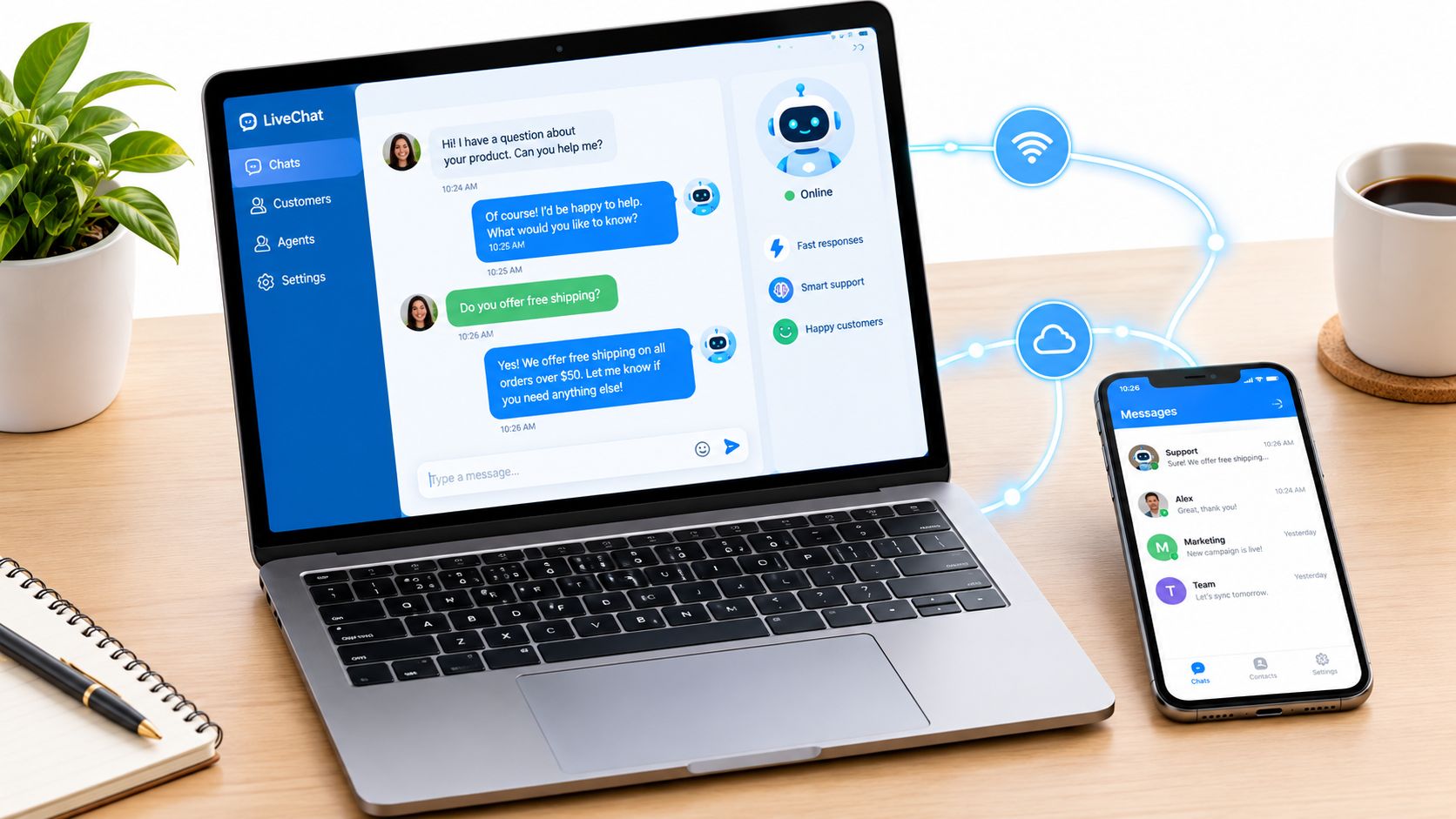
Live chat was available for an average of 17 hours and 58 minutes per day, while support agents handled 84.1 chats per day and spent about 11 hours and 48 minutes actively chatting, according to a 2026 live chat benchmark summary. That workload changes the way operators should think about the channel. Live chat support isn't a small help bubble added to a website. It's a real-time operating system for customer questions, purchase decisions, account access, and escalation.
The commercial risk is equally direct. In time-sensitive environments, customers judge the business before an agent has solved anything. A delayed acknowledgment, a failed bot handoff, or a login session that breaks during verification can turn a high-intent visitor into an abandoned session. The teams that perform well treat chat as a latency-sensitive revenue channel, then design staffing, automation, routing, measurement, and network access around that reality.
What Live Chat Support Really Is in 2026
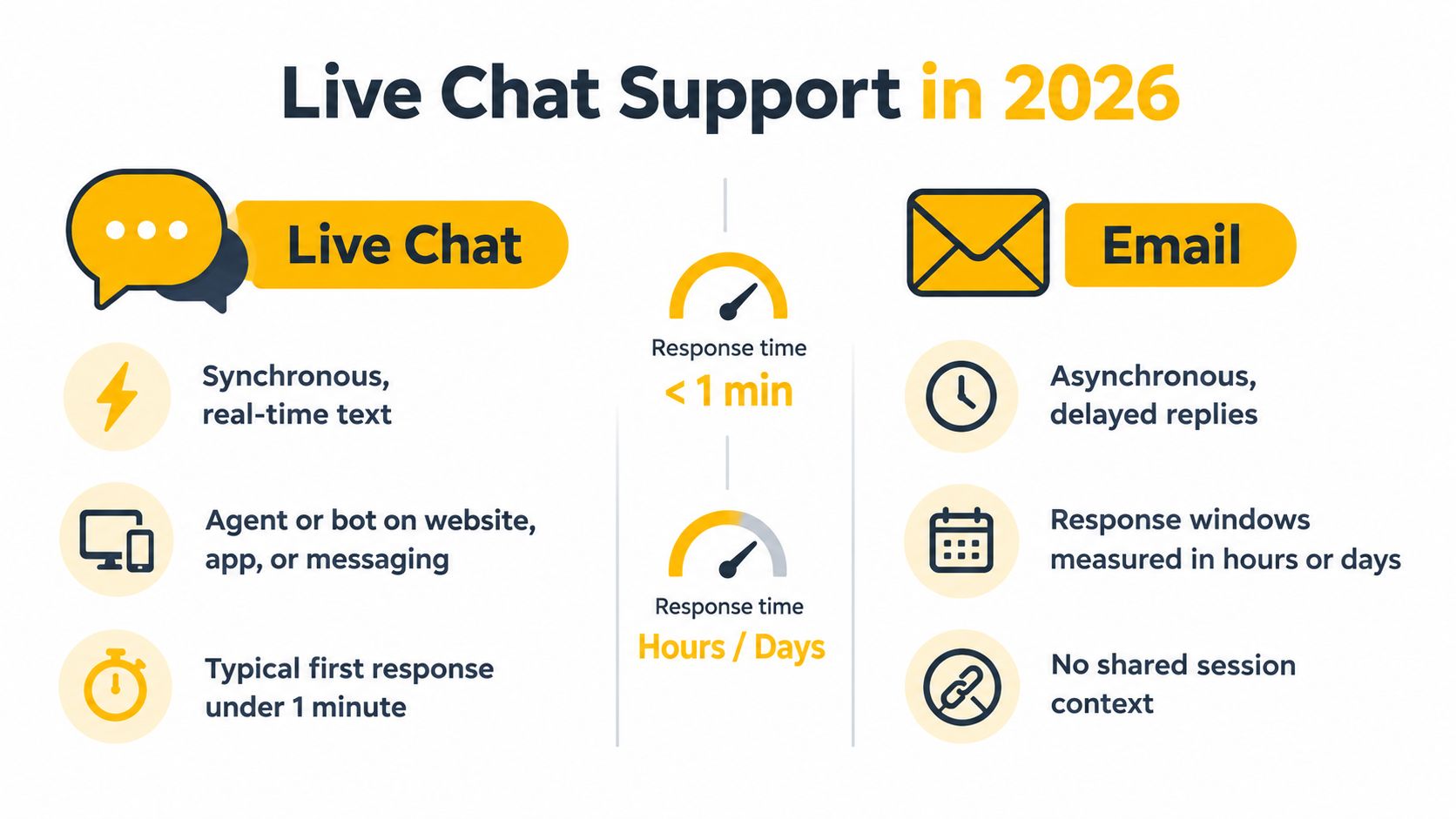
Live chat support is a synchronous text conversation between a customer and an agent, bot, or both. The customer expects the exchange to happen in the same session, with answers arriving while the question is still relevant. Email is asynchronous and usually ticket-based. Phone support is also synchronous, but it depends on voice, scheduled availability, and staffing that can be more expensive to scale.
The modern channel rarely consists of one website widget. A serious operation may combine a web SDK, an in-app chat module, WhatsApp, Messenger, Instagram direct messages, and an SMS-style fallback. Those surfaces should feed a shared inbox or routing layer, so an agent can see the customer's identity, previous messages, page context, campaign source, and open cases without asking the customer to start again.
Design the operation before the widget
A chat deployment needs decisions about staffing, concurrency, queues, availability, language routing, and escalation before launch. Agents must know how many conversations they can handle without producing shallow answers. Supervisors need queue rules for sales, technical support, account access, and urgent incidents. If the team advertises coverage it can't provide, the status message becomes a trust problem.
Automation adds another operating layer. A bot can collect an order number, classify intent, surface a knowledge-base article, or ask permission to transfer the conversation. It shouldn't conceal the human queue or continue looping after the customer has clearly requested an agent.
A useful operational definition is simple: live chat support is a real-time customer workflow with a measurable entry point, response commitment, ownership model, context store, and exit condition. Benchmark your setup against those elements. If you can measure when a customer enters, when someone acknowledges them, who owns the conversation, what context is available, and how the issue ends, you've built an operation. If you can only point to a chat icon, you've installed a feature.
Why Live Chat Support Has Become a Default Channel
Live chat records 85% satisfaction, compared with 61% for email and 44% for phone support, according to this customer service report. The gap reflects more than preference. Chat lets customers ask questions without leaving the page, writing a formal email, waiting for a callback, or repeating the issue over voice.
That advantage matters during product comparison, compatibility checks, checkout, and account recovery. These are latency-sensitive moments. A response that arrives while the buyer is still deciding can remove an objection. The same response after the visitor leaves may have no commercial value.
| Metric | Live chat | Phone | |
|---|---|---|---|
| Customer satisfaction | 85% | 61% | 44% |
| Customer interaction | Real-time text with an agent or bot | Asynchronous, ticket-style exchange | Real-time voice conversation |
| Scaling model | Concurrency, routing, automation, and queue control | Case volume and response queues | Agent time dedicated to one caller |
| Commercial role | Resolves objections during the buying journey | Nurtures or resolves after the visit | Handles complex or high-emotion issues |
The same report says 53% of retailers offer live chat, and more than 515,000 websites have embedded it. Those figures place chat in the mainstream. They also raise the operating standard: displaying a chat invitation creates an expectation of timely attention.
Speed changes the economics
Response speed affects whether support can influence a decision. A Forrester-based figure summarized in the report cited above associates live chat use with a 29% average conversion increase compared with relying only on email or phone.
A live chat statistics summary reports an average conversion increase of about 20% after chat is added, with around 40% of engaged visitors likely to make an online purchase. Treat these figures as directional, not as a forecast for every business. Measure conversion by page type, traffic source, intent, and chat exposure before changing staffing levels.
Set a response-time threshold for commercial pages and make the threshold visible to the team. If AI cannot answer confidently within the approved workflow, it should hand off with the transcript, page context, and collected details intact. A fast bot that delays human ownership can increase frustration rather than reduce it.
Distributed support teams also need a stable network path. Region-aware routing, persistent sessions, and low-latency access to internal systems affect whether agents can respond before the buying moment passes. Proxy and network choices should support the team's operating regions and access controls without introducing connection failures or inconsistent page access.
Customer preference makes chat a default channel, but the invitation creates a service promise. Staff it, monitor the latency, and route conversations according to commercial urgency.
Core Building Blocks of a Live Chat Support Stack
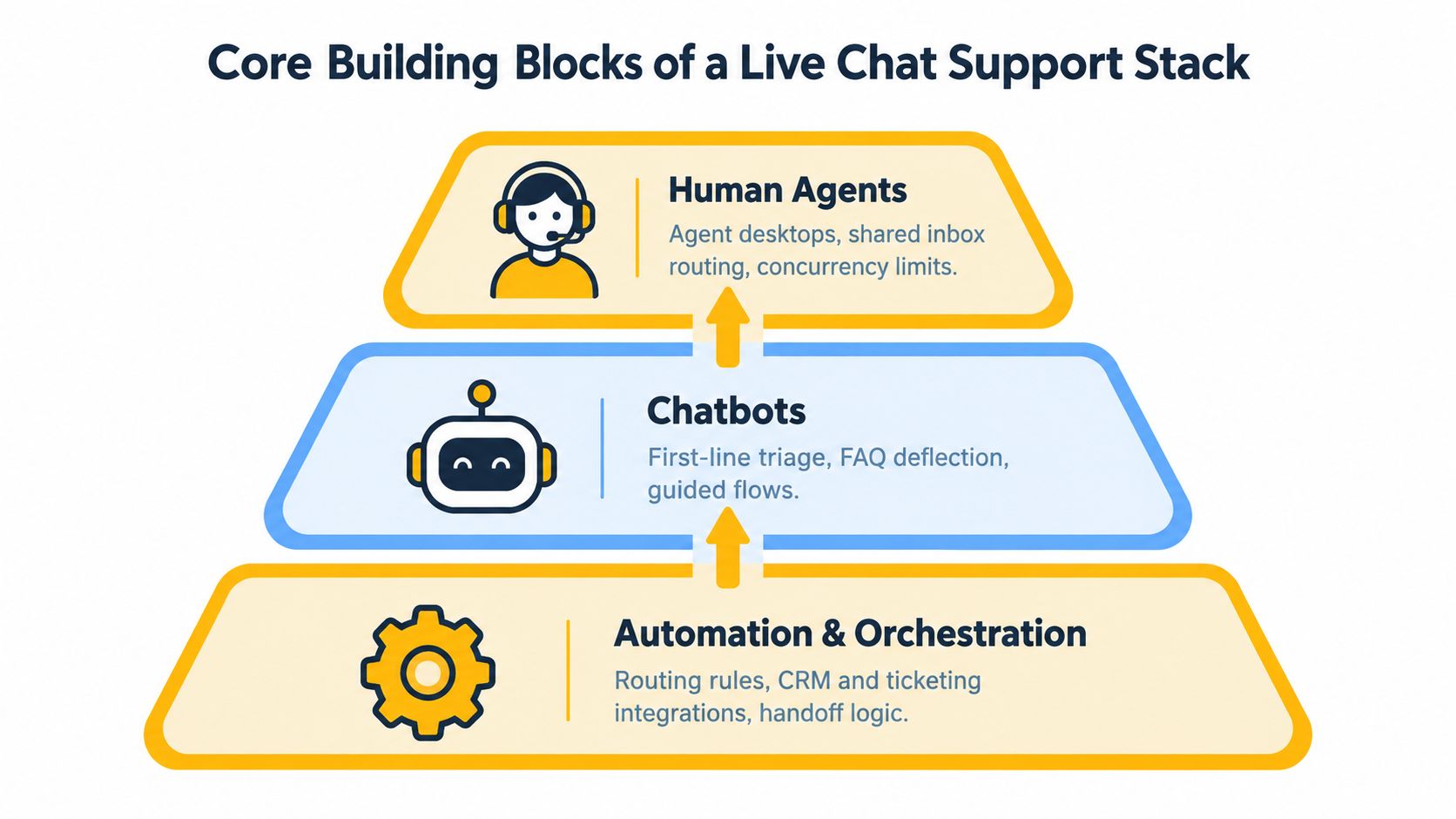
A dependable live chat support stack has three connected layers: human agents, chatbots, and automation or orchestration. Problems usually appear at the boundaries. A capable bot still damages trust if it can't transfer a transcript. Skilled agents still underperform if routing sends technical questions to a sales queue.
Human agents need usable context
Agents work from a desktop or shared inbox that combines the conversation with customer history, page URL, campaign source, account status, and relevant knowledge articles. Canned responses should be treated as editable starting points, not scripts that replace judgment. A macro that answers a common setup question is useful. A macro that ignores the customer's actual error creates repetition.
Concurrency needs a deliberate ceiling. An agent answering several simple questions may work efficiently with macros and a clear knowledge base, while a technical investigation may require exclusive attention. Set the limit by conversation complexity, then review abandoned chats, CSAT, and reopens rather than optimizing for the largest possible queue.
Bots should have explicit boundaries
An intent-based FAQ bot works well for predictable questions such as shipping rules, password instructions, or documentation discovery. An LLM-powered assistant can handle more natural phrasing when it retrieves from approved documentation and clearly marks uncertainty. Neither system should invent policy, promise an exception, or keep a customer trapped after a failed answer.
Automation determines whether the layers behave as one system. Useful triggers include page type, campaign source, repeat-visitor status, product behavior, sentiment, and pre-chat answers. Routing can assign language, product, region, or urgency. Auto-translation and AI summaries can reduce friction, but the agent still needs access to the original transcript and the customer's stated goal.
Handoff contract: A bot may collect information, but the human must receive the conversation history, intent, authentication state, sentiment signals, and promised next step without asking the customer to repeat them.
Write that contract before choosing automation. Define the events that trigger escalation, the data passed to the agent, and the message shown to the customer during transfer. The stack isn't agents plus bots. It's the continuity between them.
Setting Up Live Chat Support Without Common Pitfalls
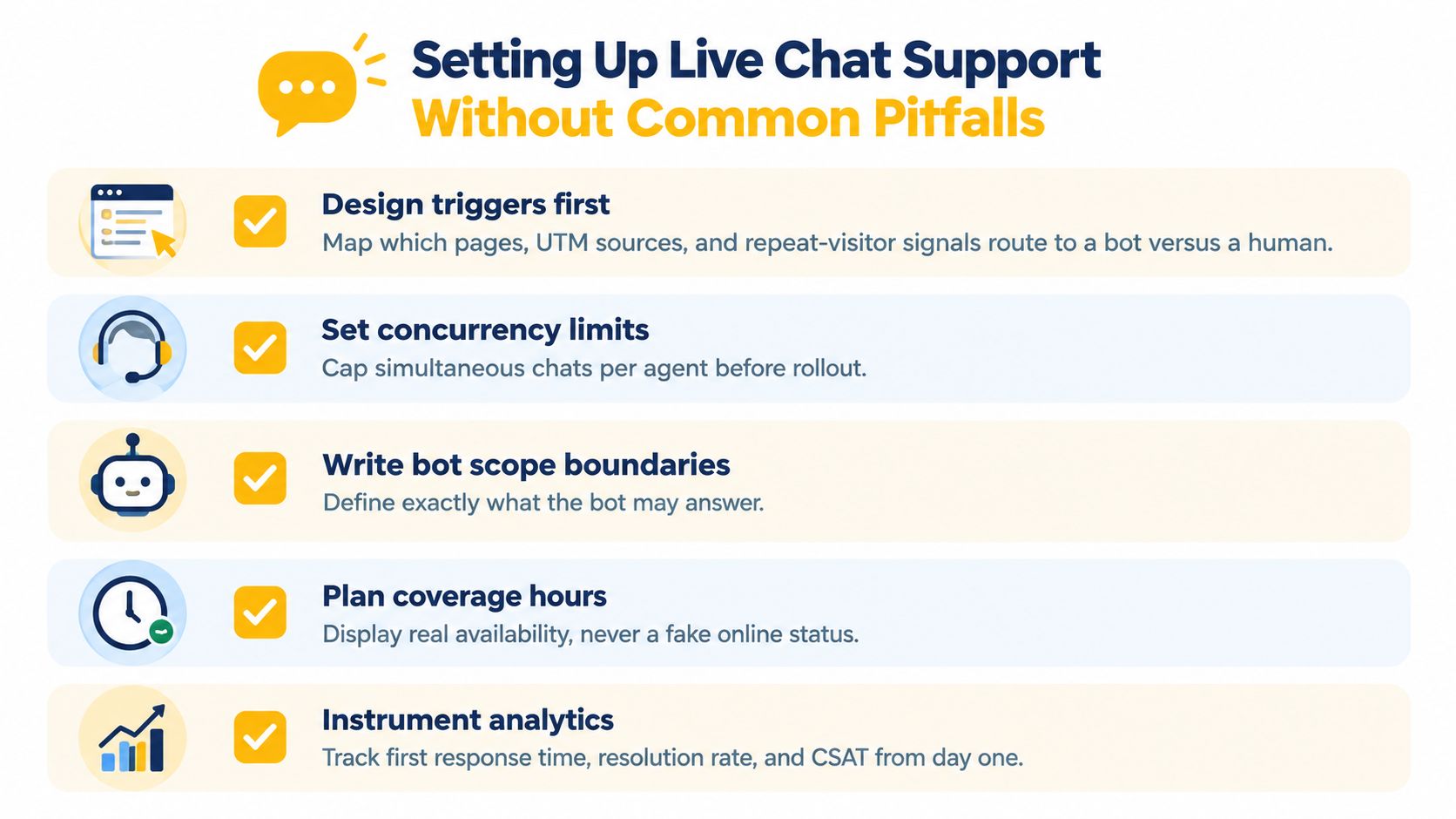
Treat implementation as an operations design problem. Software can display a chat window quickly, but it can't decide which visitors deserve proactive help, how many conversations an agent can manage, or what happens when every specialist is busy.
Start with entry rules. Map high-intent pages, campaign parameters, repeat-visitor signals, account status, and local business hours. A visitor on a pricing page may need a sales-trained agent. A visitor reading a general guide may be better served by a knowledge-base bot. Suppress proactive invitations when the queue is closed, and show the actual availability state instead of a permanent online badge.
Build the queue around concurrency
Expected simultaneous conversations matter more than the total number of tickets. Set an initial concurrency ceiling for each queue, then validate it with transcript quality, response delays, transfer rates, and customer satisfaction. Technical support, account recovery, and accessibility-related conversations usually need more attention than straightforward order-status questions.
Define routing before launch:
- Queue ownership: Assign sales, technical, billing, and incident conversations to named teams.
- Language coverage: Route by customer language and provide a clear fallback when no specialist is available. Teams needing a structured approach can review this multilingual support guidance.
- Escalation tiers: Specify when an agent transfers to a specialist, supervisor, security reviewer, or offline case.
- Context continuity: Pass the transcript, customer details, intent tags, attachments, and previous promises automatically.
Test the edges, not just the happy path
Test the widget on mobile breakpoints, slow connections, authenticated and unauthenticated pages, and domains with different browser security behavior. Verify that a customer can reopen a conversation without losing identity or history. Load tests should measure queue behavior, not just whether the interface renders.
Before the first live conversation, document macros, prohibited bot answers, outage procedures, refund authority, privacy handling, and escalation contacts. Run transcripts through the process and ask one question: could the next agent continue without making the customer start over?
Key KPIs That Predict Live Chat Support Performance
A dashboard full of chat volume can hide a failing operation. Useful metrics connect to an operator decision: add coverage, change routing, narrow bot scope, rewrite a macro, or repair a conversion path.
First response time is the clearest latency signal. Industry benchmarks place average first response around 35 to 46 seconds, while satisfaction reaches 84.7% when the first response arrives within 5 to 10 seconds. Performance drops sharply as the wait extends beyond roughly one to three minutes, according to a live chat latency benchmark. A separate 2025 benchmark report reports an average wait of 23.6 seconds in 2024, with 81.37% of teams under 30 seconds. Set the operating target below 30 seconds, with stricter handling for purchase-intent traffic.
| KPI | Target threshold | Decision lever |
|---|---|---|
| First response time | Under 30 seconds, supported by the latency benchmark cited above | Change staffing, queue priority, or proactive triggers |
| Abandonment rate | Downward trend as response delay falls | Add coverage or remove low-value invitations |
| Average handle time | Stable by intent and complexity | Improve macros, knowledge, and escalation paths |
| Revenue per chat | Measured on high-intent journeys | Assign commercial coverage and test page triggers |
| CSAT after chat | Reviewed beside containment | Narrow bot scope when deflection harms satisfaction |
| Agent concurrency | Within the approved queue limit | Rebalance shifts and complexity assignments |
Containment needs to be measured with CSAT. A bot that closes conversations quickly may be ending conversations customers still need. Track the AI-to-human handoff rate and review whether agents receive enough context to resolve the issue without repeating the bot exchange. For commerce, connect chat sessions to campaign and order data where consent and privacy rules allow. For support, compare CSAT with repeat-contact rate, because a fast answer that misses the root issue creates another conversation.
Revenue per chat shows whether the channel supports buying decisions, while CSAT shows whether it protects the customer relationship.
Track latency by queue, device, language, page type, hour, and network path. Distributed teams can otherwise mistake a healthy overall average for reliable service, while mobile checkout visitors or one regional route wait too long. Compare AI response time with human response time, and use a responsive customer service framework to turn those findings into staffing, workflow, and connection-quality changes.
Choosing the Right Network Layer for Distributed Live Chat Support
Network access affects authentication stability, regional QA, and the trust signals attached to distributed sessions. It also affects response latency, so select a route based on the customer journey or test being run, not on a general preference for speed.
Mobile proxies send traffic through real 4G or 5G carrier IPs. Carrier-grade NAT, or CGNAT, can place many legitimate subscribers behind one public IPv4 address. That shared context may reduce the collateral risk of blocking compared with an isolated server address, as described in this mobile proxy overview. For distributed support teams, mobile routes can help validate regional access and carrier-specific behavior, but they may introduce more variable latency.
Residential proxies use addresses associated with household or consumer networks. They suit sensitive QA journeys that require a persistent residential context, provided the team evaluates cost, speed, consent, and provider governance. Datacenter proxies use hosted infrastructure. They are often fast for internal services, although repeated high-volume egress can differ from ordinary customer traffic and may produce a less representative test.
Match protocol to the session
HTTP proxies operate at the application layer and fit web requests or API-driven bot pipelines. SOCKS5 works at a lower level and can relay broader TCP and UDP traffic, which suits clients needing general session transport. The proxy protocol and ASN guide provides additional terminology, but the operational choice is straightforward: use HTTP when the application expects web proxy handling, and use SOCKS5 when the client requires broader transport support.
| Proxy type | Protocol | Best-fit use case |
|---|---|---|
| Mobile 4G or 5G | HTTP or SOCKS5 | Regional QA, distributed customer-facing access, carrier-context testing |
| Residential | HTTP or SOCKS5 | Persistent user-journey validation and sensitive QA |
| Datacenter | HTTP or SOCKS5 | Back-office automation and controlled internal tooling |
| ASN-targeted pool | HTTP or SOCKS5 | Keeping rotated sessions within one carrier or network-owner footprint |
Choose sticky sessions when authentication, cookies, or stateful actions need one IP for a defined period, and measure the resulting round-trip impact with this latency measurement guide. Use rotation when monitoring or distributed testing benefits from changing endpoints. Fixed-window persistence and frequent rotation serve different testing goals, as outlined in this session and geo-targeting reference. Apply country, state, or city targeting only when the test requires it. Keep automation within applicable privacy rules and platform policies.
Most Common Live Chat Support Mistakes and How to Avoid Them
The most expensive failures aren't always outages. They're small design choices that make customers repeat themselves, wait behind the wrong queue, or lose access to a human at the moment of highest intent.
The first is a broken AI-to-human handoff. A bot answers outside its approved scope, fails to recognize frustration, or ignores a direct request for an agent. When a transfer finally occurs, the transcript, intent tags, authentication state, or uploaded details may disappear. Customers then repeat the same explanation, which damages trust before the human has started.
Fix it with hard escalation rules. Escalate after repeated low-confidence answers, explicit human requests, negative sentiment, authentication problems, billing disputes, and high-risk account actions. Pass the full transcript and summarize the unresolved question in the agent workspace.
Remove the false promise of constant availability
An always-on bot can create the appearance of coverage while blocking a human queue during a peak. If no agent is available, tell the customer what will happen next. Offer a case, callback, or scheduled response only when the team can honor it.
Staffing models also fail when they assume every chat has the same cost. A campaign can fill a queue with purchase questions while a technical incident consumes specialist capacity. Review concurrency by intent, not only by agent, and create a priority route for active checkout or account-risk cases.
Treat the widget as part of the funnel
A proactive prompt on every page load becomes visual noise. A hidden entry point on mobile prevents customers from asking for help. Test placement, timing, language, and keyboard accessibility on high-intent pages, then suppress prompts that don't produce useful conversations.
Finally, replay real transcripts. Tag bot failures, missed escalation signals, incorrect macros, and repeated questions. A weekly QA review should turn those tags into one concrete change, such as a new article, a narrower bot boundary, or a routing rule. Without transcript review, the same deflection error will keep returning.
Live Chat Support by Role, From SMM to QA Teams
The same live chat support infrastructure behaves differently depending on who operates it. A social media manager optimizes for context and response speed across public and private channels. A QA tester cares about reproducibility. An automation team cares about event integrity and the data attached to each handoff.
Social media managers
Social teams manage conversations that begin in comments, replies, direct messages, and ad destinations. The original post, campaign, product, and customer language should travel with the conversation. If a promotional comment becomes a private chat, the agent needs the offer context immediately, not after asking which post the customer saw.
Routing should distinguish general engagement from purchase intent. A question about availability can go to a commercial queue, while a complaint about an existing order should reach support with an order lookup path. Teams should also define moderation and privacy rules before moving a public exchange into a private channel.
Affiliates and multi-tenant operators
Affiliate teams need strict account and campaign isolation. Separate inboxes, consent records, cookies, and routing rules prevent one offer from contaminating another. The operator should be able to identify which campaign created the conversation and which team owns the next action, without exposing unrelated customer data.
A two-offer scenario on one domain illustrates the risk. Each offer may require a different qualification flow, disclosure language, and follow-up queue. Shared infrastructure is fine, but the conversation context and compliance trail must remain separated.
QA testers
QA teams use chat to validate user journeys rather than provide production support. They simulate regional visitors, concurrent sessions, throttled connections, mobile layouts, transcript replay, and bot escalation. A useful test doesn't stop when the widget opens. It checks whether the correct queue receives the conversation and whether the human sees all prior context.
Network selection matters for geo-dependent flows. Mobile carrier IPs can help test how a journey behaves for users connecting through carrier networks, while a controlled residential or datacenter environment may suit a different test objective. Every test should use authorized accounts and documented scenarios.
Automation teams
Automation teams connect chat to CRM events, webhook responses, order systems, and enrichment workflows. A refund event, for example, can open a conversation with the order identifier, refund status, customer language, and recommended next action already attached. The agent should verify sensitive information rather than blindly trust an event payload.
| Role | Primary surface | Key constraint | Live chat scenario |
|---|---|---|---|
| Social media manager | Social DMs and campaign pages | Preserve post and campaign context | Route a product question from a promotion into the commercial inbox |
| Affiliate operator | Segmented landing pages and inboxes | Isolate accounts, offers, and compliance records | Keep two offers on one domain operationally separate |
| QA tester | Web, app, and regional journeys | Reproduce latency, routing, and handoff behavior | Replay concurrent sessions through an authorized network pool |
| Automation team | APIs, webhooks, and CRM events | Preserve event data and permission boundaries | Open a refund conversation with verified order context |
Teams that serve customers in multiple languages should formalize routing, translation review, and escalation ownership rather than relying on ad hoc agent decisions. A shared live chat process can support many roles, but each role needs its own success criteria and data boundaries.
Evoproxy provides mobile 4G connectivity for distributed social media management, regional QA, market research, ad verification, and geo-dependent user-flow testing. If your live chat operation needs carrier-network sessions for a specific, authorized workflow, visit Evoproxy to review the available mobile proxy options.


