
A French mobile user opens your SaaS dashboard, a German marketer checks a campaign, and an English-speaking support agent receives the resulting question. The product detects the wrong locale, the help article appears in English, and the customer can't explain which screen failed. The proxy connection may be working perfectly, yet the experience still breaks before anyone reaches a useful answer.
That failure is common because multilingual support isn't just translated copy. It includes language discovery, interface behavior, documentation, support routing, accessibility metadata, locale-aware testing, and the network conditions that shape what users see. For global SaaS teams, social media managers, data teams, ad verification specialists, resellers, and growth marketers, language is part of the operating system.
Introduction to Multilingual Support in a Global Product
A customer in France opens a SaaS dashboard, but the language selector is difficult to find. The help center offers French articles, while the support form sends the request to an agent who cannot reply in French. On mobile, the same user may encounter a different redirect, consent prompt, or verification screen because the network path changes what the product serves.
That sequence shows why multilingual support is an operating system, not a translation layer. Discoverability can fail before translation does. Execution can fail next, through UI rendering, proxy geo-targeting, locale detection, support routing, or escalation. A product can contain accurate French copy and still deliver the wrong experience.
The web remains largely single-language, while internationally visible products commonly serve several audiences. One analysis found that 33.7% of the one million most visited sites are multilingual, and those sites average 7 languages each, according to the State of Multilingualism report. This contrast helps SaaS teams set expectations: language coverage is a product decision tied to audience, infrastructure, and operations.
Support creates another execution gap. An industry study reports that 88% of support teams offer help in more than one language, while only 28% of users say they see support in their native language, as summarized in the language and online support report. A language badge cannot close that gap. Detection, routing, content coverage, escalation, and measurement must work together.

This guide examines that system, from interface behavior and accessibility to localization workflows, geo-dependent testing, support operations, and customer-language measurement.
What Multilingual Support Really Means
A customer can select French and still receive an English error message, an untranslated billing screen, or support from a queue that cannot respond in French. That experience shows why multilingual support is an operational system, not a translation setting. Translation changes the words on a sign. Localization makes sure the sign, the directions, the payment method, and the person answering questions all make sense to the visitor.
Translation is only the first layer
Translation transfers meaning between languages. It works well for stable product descriptions and straightforward help articles, but literal conversion does not resolve every user-facing problem.
Localization adapts the experience to a specific locale, combining a language with regional conventions. These conventions can include date and number formats, terminology, tone, imagery, legal wording, keyboard expectations, and cultural references. A campaign workflow for a German-speaking customer may need different terminology from one aimed at a Swiss German audience, even though both use German.
Internationalization, often shortened to i18n, is the engineering preparation that lets software support multiple locales without rewriting its core. It includes externalizing strings, allowing for text expansion, supporting different writing directions, formatting dates and numbers, and keeping language-specific content out of application logic.
Treat the product as a connected experience
A language system covers every point where a customer must find, use, or complete something:
- Discovery: The visitor can identify available languages and switch without losing context. Geo-targeted entry pages and proxy-based regional testing can reveal whether the right language appears for the right audience.
- Product UI: Buttons, errors, onboarding, billing screens, notifications, and transactional messages use the selected locale.
- Knowledge content: Documentation and troubleshooting steps match the interface version the customer sees.
- Human support: Routing, staffing, escalation, and response templates reflect the customer's language.
- Operational testing: Teams validate complete tasks by locale, device, network, and region instead of checking translated strings in isolation.
Language metadata is a small technical signal with a large effect. Correct metadata tells browsers and assistive technologies which language a page or segment uses. Without it, a screen reader may pronounce a French phrase using English rules, making navigation and comprehension harder.
Practical rule: A language is supported only when a user can discover it, use the core workflow, get help, and complete a task without reverting to English unnoticed.
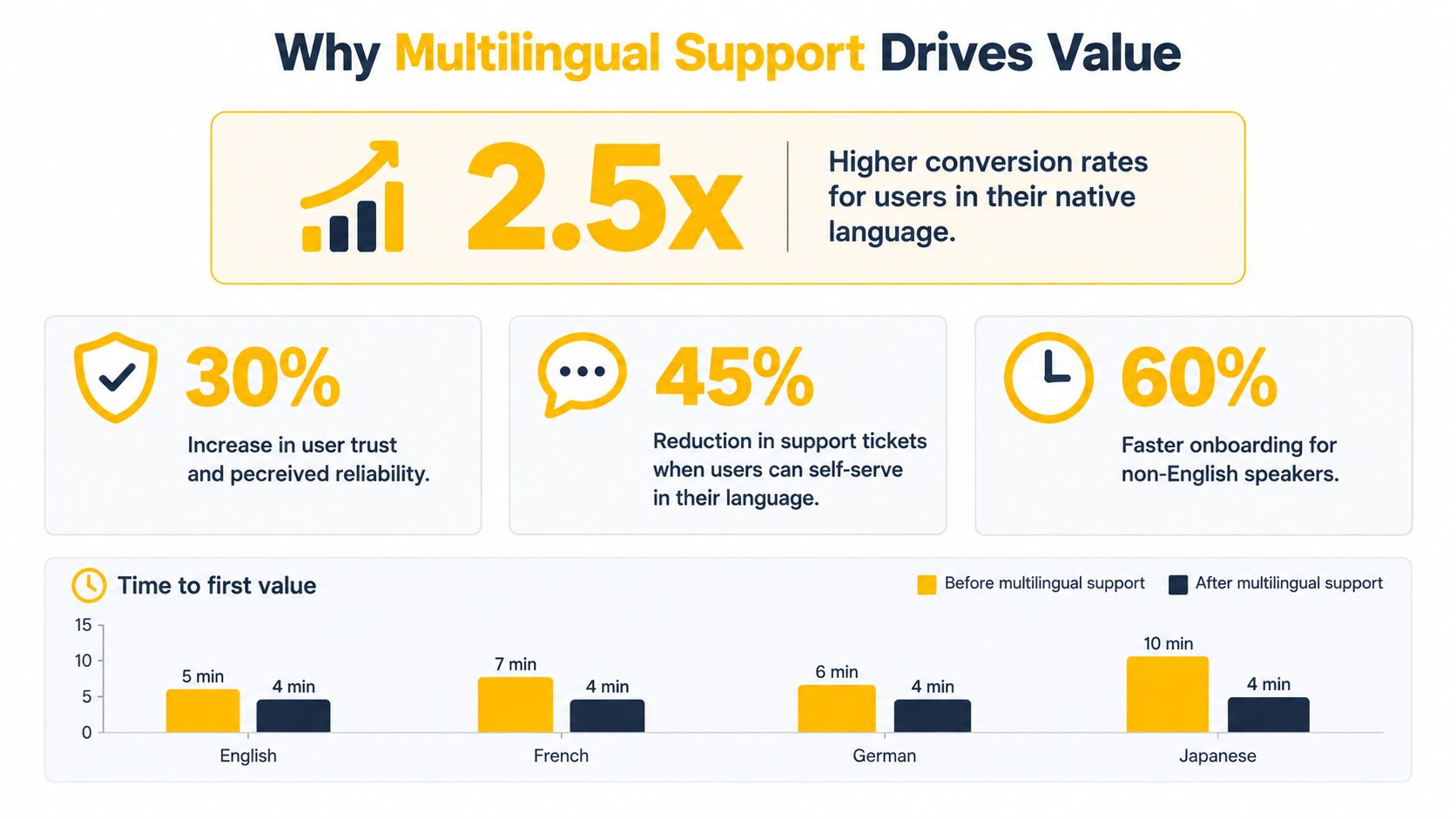
The distinction matters for governance. A translated string can pass linguistic review while the workflow still fails because the selector is hidden, the error message remains untranslated, the documentation URL changes unexpectedly, or the support queue lacks a language-aware escalation path. Discoverability, interface behavior, regional delivery, and support execution must therefore be tested as one connected system.
Why Multilingual Support Drives Business and Technical Value
A prospect may first meet a product through a search result, then judge it through onboarding, and later depend on support to resolve a problem. These moments feel like one experience to the customer. Language affects all of them, so multilingual support creates both commercial value and technical visibility.
The commercial case
A native-language experience reduces the effort required to interpret permissions, pricing, setup steps, and error messages. Users can understand what a product does and complete an initial workflow with less uncertainty. Marketing and growth teams can also test demand in Europe, Asia, and North America without treating English behavior as a universal proxy for every market.
Language coverage is therefore part of discoverability and product credibility, not merely a translation task. English remains common across website content, while multilingual experiences appear more frequently among highly visited sites. For a SaaS operator, localized pages can affect whether potential customers find the product and whether the company appears prepared to serve their market.
Support adds an operational test. A language option creates little trust if a French question enters an English-only queue, or if a translated help article omits the product flow the customer currently sees. The failure occurs in routing and execution, before translation quality becomes the main concern.
The technical case
Locale awareness gives engineering teams a clearer way to separate failure types. A test can show whether a problem comes from translation, redirects, authentication, browser language settings, geo-targeted content, or network behavior. That separation turns a vague localization complaint into a fixable system issue.
Geography-dependent products also need testing conditions that resemble customer access. A mobile proxy uses a mobile carrier network, a residential proxy uses an access connection associated with a residential endpoint, and a datacenter proxy comes from hosted infrastructure. Mobile 4G and 5G addresses may be harder to block than datacenter addresses because carrier networks commonly place many devices behind shared address pools.
These categories describe test conditions, not guaranteed access. Teams still need to respect destination rules and interpret geo-dependent results in context. A regional result may reflect routing, address reputation, or shared carrier behavior rather than the language experience itself.
The business case should connect language coverage with engineering and service effort. A cost-benefit analysis framework can help compare support workload, QA risk, market reach, and expansion priorities before a team commits to another locale.
Designing UI UX and Engineering for Multilingual Experiences
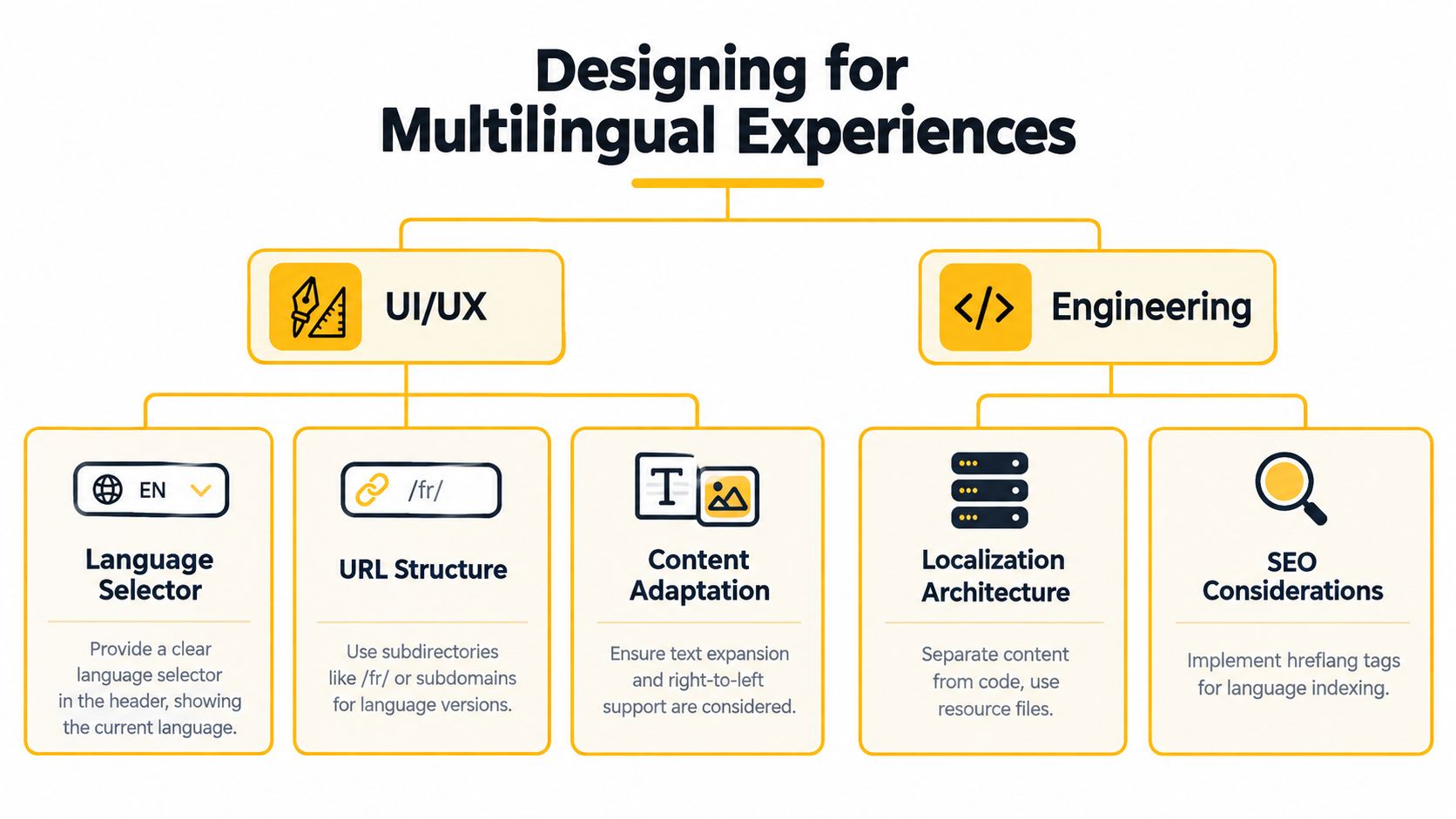
A customer switches language during onboarding and suddenly loses their place. Another sees translated buttons overlap, while a third receives a different regional page from the same URL. These failures show why multilingual support is an operational system. Translation supplies the words, but UI structure, discoverability, network conditions, and support routing determine whether the experience works.
Build the visible path first
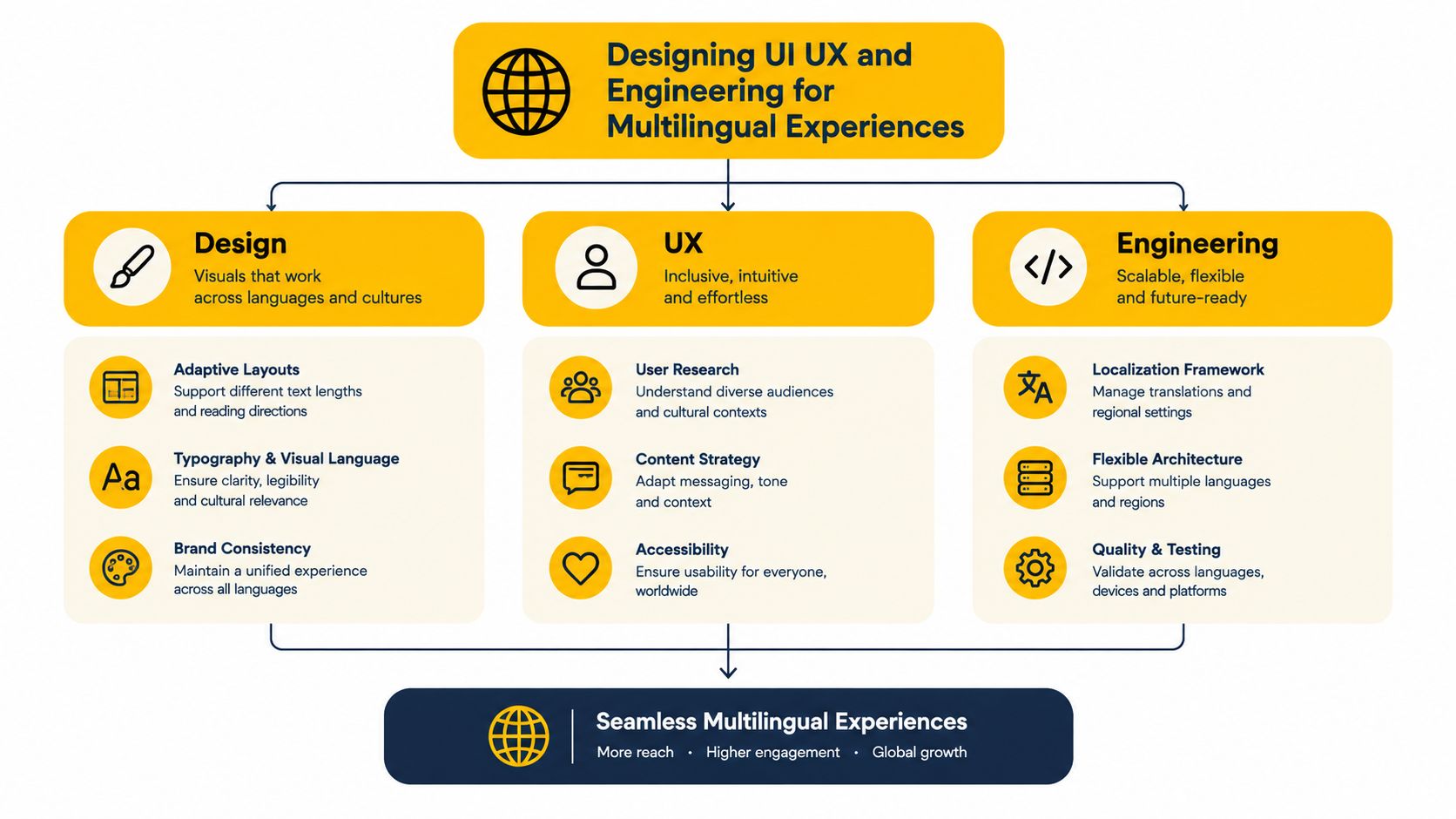
A language selector should be easy to find, identify the active language, and keep the user in the same product location when possible. Switching from English to French should not restart onboarding. Automatic detection can save a click, but it should never remove user control because browser preference, account preference, and physical location may disagree.
Search engines and users also need a clear URL pattern. Language subdirectories, language subdomains, or another stable structure can work when each locale has indexable content, consistent internal links, and a predictable relationship to the default version. Use a stable URL pattern where each language has its own path and consistent internal linking, following multilingual project structure guidance as a reference for organizing locale-specific paths.
Then test layout pressure. German labels may take more space than English labels. Right-to-left languages change alignment and reading order. Mixed-language pages, embedded names, and user-generated text can expose defects that a clean translation preview misses. A useful review follows a real task, such as selecting a plan, inviting a teammate, or resolving an error.
Validate the underlying signals
Store interface strings in separate resource files so translators and reviewers can work without changing application logic. Add accurate language metadata at the page and segment levels, preserve heading hierarchy, and confirm that keyboard focus remains logical after localization.
Accessibility crosses language boundaries. Assistive technology may behave differently when it encounters mixed-language content. Test screen readers across language switches, translated navigation, and embedded foreign-language snippets. The multilingual accessibility study provides context for why these cases deserve direct testing rather than assumptions based on a translated visual preview.
Regional testing adds another layer. HTTP proxies route web requests through an HTTP-aware intermediary, while SOCKS5 works at a lower connection level and can support broader traffic patterns. Geo-targeting may use country, state, city, ZIP, or ASN, the autonomous system number associated with a network operator. Choose the targeting level that matches the question: broad market behavior needs country coverage, while network-specific QA may require city or ASN detail. For implementation considerations, consult geo-targeting implementation guidance.
Session behavior affects repeatability. A rotating session changes the IP between requests, while a sticky session keeps the same IP for a defined period. Use sticky behavior for login, checkout, or any workflow that needs continuity. Use rotation only when the test explicitly requires changing network identities and the activity remains compliant. Session-control details are available in session-control documentation.
| Decision Area | Option A | Option B | When to Choose |
|---|---|---|---|
| Language selection | Automatic detection | Manual selector | Use detection for convenience, but always provide user control |
| URL organization | Language subdirectories | Language subdomains | Choose the structure your team can maintain consistently |
| Session behavior | Rotating session | Sticky session | Use rotation for controlled variation, sticky sessions for continuous workflows |
| Network transport | HTTP | SOCKS5 | Match the protocol to the application and test harness |
| Geo-targeting | Country-level | City or ASN-level | Use broader targeting for market checks, finer targeting for network-specific QA |
Localization Workflows and Tools That Scale
A scalable localization workflow separates content production, linguistic review, engineering validation, and release monitoring. A green build confirms that code compiles. It does not confirm that a translated interface fits, communicates the right meaning, or routes a customer correctly.
Compare workflow models
A translation-first workflow sends source strings to a translation queue, imports the results, and checks them in context. It works efficiently for stable, low-risk content, but can miss cultural adaptation, layout changes, and terminology that depends on the user's task.
A localization-first workflow begins with locale research. Reviewers define terminology, tone, prohibited phrasing, and market-specific examples before translation, then validate the result inside the product. The extra coordination pays off for onboarding, billing, support, and workflows where misunderstanding creates operational cost.
An AI-assisted workflow can draft or classify content, while human reviewers check material with a high user or business impact. Adoption remains uneven. A recent Microsoft multilingual evaluation survey reports that 35% of international businesses still handle translation manually, 33% use traditional automation with human review, and 17% have implemented next-generation AI tools. These figures describe adoption, not quality. Set review rules according to risk, and keep human approval for content where an error could block access, payment, or support.
Test adaptation, not just wording
The Marco-Bench-MIF paper evaluates 30 languages with deep cultural adaptation. Its authors report that machine-translated data can underestimate multilingual model performance by 7% to 22%. For product teams, the broader lesson is practical: translated test data can distort readiness checks.
Create test cases by language pair, locale, task type, and risk. A login test should check the translated button, error recovery, password guidance, assistive technology output, and support escalation. A price-monitoring workflow should verify currency presentation, region-specific availability messaging, and the language shown after a redirect. Proxy geo-targeting can reproduce market conditions, but the test must also confirm that the interface, content delivery, and support route agree about the customer's locale.
Lower-resource languages require fewer assumptions. Build human review into safety-sensitive flows, maintain language-specific error inventories, and record failures by locale rather than hiding them in one global pass rate. The localization QA testing practices provide a useful structure for checking language, layout, functionality, and routing together. That operational view catches failures before a translated string becomes a customer-facing incident.
Running Support Operations and Measuring What Matters
Support breaks at handoffs, much like a package that reaches the wrong sorting center. A customer can select French, write a French message, and still receive an English template when the ticketing workflow stores language as an optional note rather than a routing field. Translation quality cannot repair a route that loses the customer's locale.
Design the route before adding coverage
Language detection can combine account preference, browser preference, selected interface language, and the incoming message. Each signal can be wrong on its own. Let agents correct the detected language, then preserve that choice across follow-up messages, reassignment, and escalation.
Staffing does not require every agent to speak every language. It requires clear ownership for the languages you advertise, translated macros that agents can personalize, and an escalation path for cases that machine assistance cannot safely resolve. Proxy geo-targeting can reproduce a market condition, but support routing must still confirm that the detected region and language match the customer's actual journey.
Coverage is an operational promise. A help-center badge signals intent. A routed conversation, an accurate answer, and a verified escalation path deliver support.
Measure the experienced service
Track the full path by language and locale, not only one global average:
- Language discovery: Record the selected language, automatic detection result, and whether users switch back to English.
- Routing accuracy: Review whether each conversation reached the appropriate queue on the first attempt.
- Resolution by language: Compare resolution outcomes and reopen patterns across supported languages.
- Self-service performance: Measure language-specific search success and deflection, while checking whether users abandon articles before resolution.
- Customer sentiment: Segment CSAT or equivalent feedback by locale and support channel.
- Coverage risk: Maintain a list of untranslated, stale, machine-only, and low-resource content.
A useful operational dashboard connects these measures rather than displaying them as isolated scores. If French resolution falls, inspect documentation coverage, detection errors, escalation speed, and interface behavior. The failure may begin before the customer contacts support, such as a locale mismatch after a redirect, then appear later as a routing problem. The responsive customer service framework offers a structure for connecting response quality with the workflow behind it. This view shows whether the system delivers the language experience it promises.
How Evoproxy Uses Multilingual Support to Serve Global Customers
An international operator testing a French campaign may need to verify more than translated copy. The team must understand whether mobile 4G, 5G, residential, or datacenter proxies fit the task, then configure rotation, sticky sessions, location, redirects, and language checks. If any layer points to the wrong region, a translation review can become a routing or network diagnosis.
Evoproxy treats multilingual support as an operational system. A multilingual interface, responsive live chat, geo-targeted proxy setup, and support workflows connect discovery with execution. Teams managing multiple social accounts can preserve stable sessions where continuity matters. Ad verification and market research teams can test region-specific experiences. QA teams can check language, location, redirects, and carrier-network conditions together, so a failure is easier to assign to the correct layer.
Proxy categories shape that testing plan. Mobile 4G and 5G proxies use carrier connectivity and may appear behind shared mobile address infrastructure. Residential proxies represent residential access, while datacenter proxies use hosted networks. Rotation changes the network context between requests. Sticky sessions preserve it for a defined user journey, such as a repeatable login flow or localized content check.
Support routing must reflect those same conditions. A social media manager, affiliate marketer, media buyer, developer, or QA specialist may report a language problem when the cause is an incorrect locale, proxy location, redirect, or session setting. Evoproxy's support model helps connect the customer's language with the technical context needed to resolve the issue.
Evoproxy offers mobile 4G proxies from France with multilingual support, responsive live chat, and flexible rotation or sticky-session options for compliant social media management, ad verification, market research, and geo-dependent QA. Visit Evoproxy to explore a mobile proxy setup that fits your language, location, and testing requirements.


