
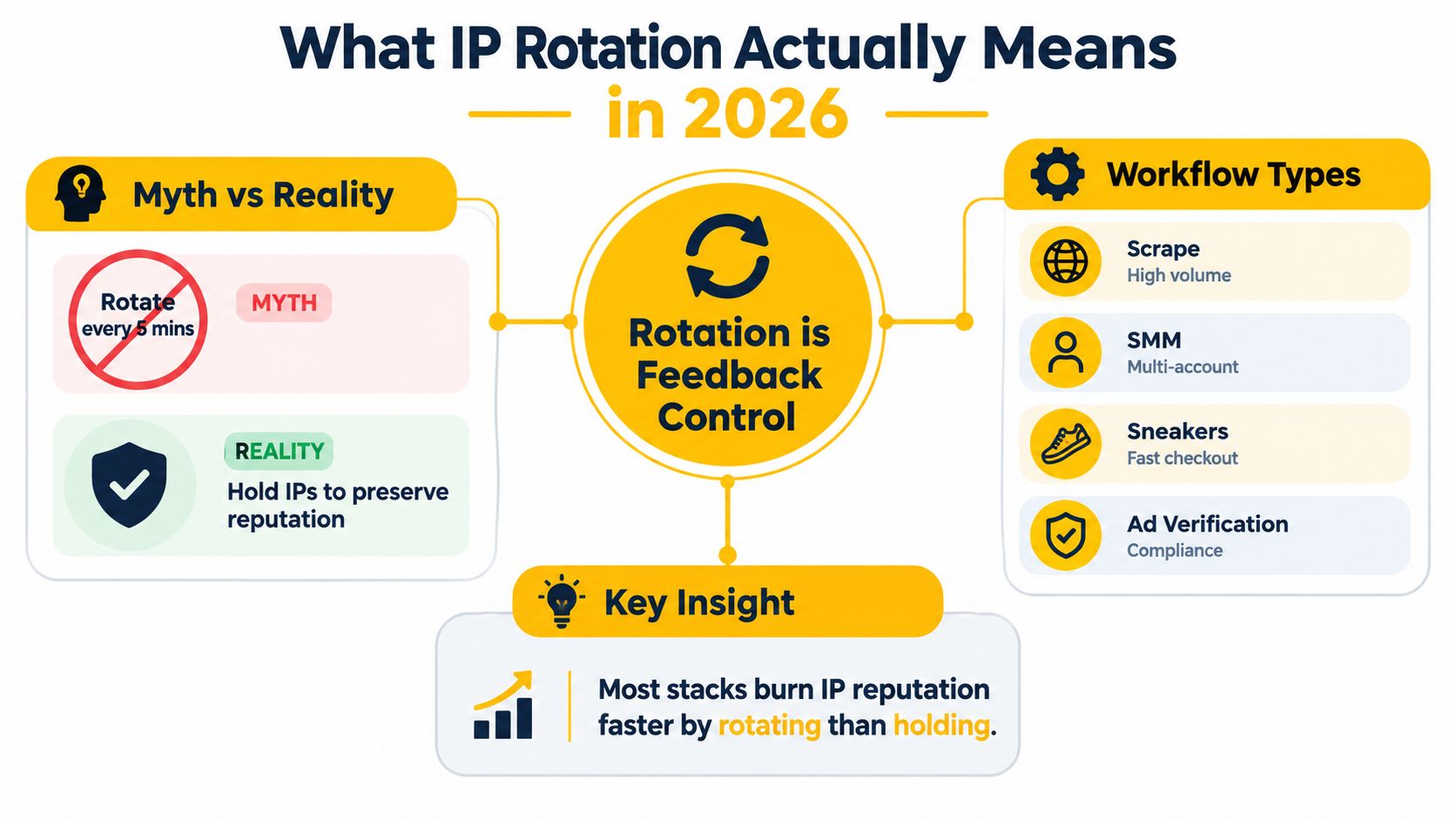
The most common advice about how to rotate an IP address is also the easiest way to damage a working proxy setup: rotate every five minutes, regardless of what the workflow is doing. That timer-first approach ignores session cookies, authentication state, carrier reputation, request velocity, and the fact that a new mobile exit may already have a shared history.
A production rotation policy works better as a feedback-control system. You hold an address while a logical session needs continuity, observe status codes, CAPTCHA frequency, latency, and response changes, then rotate when risk indicators rise. The goal isn't to change IPs as often as possible. It's to keep the network, browser, session, and request pattern coherent for the task.
What IP Rotation Means in 2026
IP rotation changes the public address visible to a destination. In production SMM, scraping, advertising, and QA workflows, that definition is incomplete. A usable policy also decides when to preserve an address, which signals indicate rising risk, and whether the next exit fits the workflow's network, ASN, geography, and protocol requirements.
Rotation works best as a feedback-control system, not a timer. Hold an address while a logical session needs continuity, observe the destination's responses, then change exits when the evidence shows rising risk. A logged-in social account, an authenticated QA journey, and independent public-data requests have different continuity requirements. Changing an exit during a multi-request transaction can invalidate cookies, alter the apparent network context, and trigger fraud controls even when the replacement address is geographically correct.
The signals that should drive rotation
A resilient controller watches destination behavior and records the result for each exit:
- HTTP status drift: Rising 429 responses indicate rate pressure. 403 responses can indicate a policy or reputation problem. Log both by exit, ASN, workflow, and request type.
- CAPTCHA frequency: A sudden increase can indicate an unsuitable carrier exit, inconsistent browser state, or excessive request velocity.
- Latency variance: Changing response times can reveal carrier congestion, a struggling gateway, or a route that does not match the intended geography.
- Response size changes: An unexpectedly small or large response may indicate a challenge page, interstitial, or partial failure.
After a failure, exponential backoff such as 2, 4, 8, and 16 seconds gives the controller time to avoid repeating the same condition. These intervals are documented in technical guidance on rotating proxy strategy. Repeated failures should place the exit in temporary quarantine instead of sending more traffic through it.
Protocol fit also affects the result. HTTP proxies suit ordinary web requests and explicit HTTP client configuration. SOCKS5 can carry broader TCP traffic, but the application must support it correctly, and DNS handling should be tested rather than assumed. Record the protocol used alongside the exit and ASN so a routing problem does not look like an IP reputation problem.
Mobile freshness is not uniqueness
Mobile networks commonly use carrier-grade NAT, or CGNAT, allowing many subscribers to share a smaller pool of public IPv4 addresses. RFC 6598 reserves 100.64.0.0/10, covering 100.64.0.0 through 100.127.255.255, for service-provider shared address space. The IETF specification for shared address space explains that these internal addresses are not globally routable.
A new mobile exit can therefore have a different IP while remaining in the same carrier ASN, or inherit a reputation shaped by unrelated subscribers. Check the ASN as well as the address. IP rotation distributes IP-level history, but it leaves cookies, browser fingerprints, device attributes, behavioral patterns, and request-rate signals available for correlation. Coverage of anti-bot detection and scraping resilience explains why those signals can persist across address changes.
Practical rule: Keep one exit for a complete logical session. Rotate between independent checks or after a completed transaction, and quarantine an exit when its measured signals deteriorate.
Mobile, Residential, and Datacenter Proxies Compared
Proxy type determines the network identity behind the address, not just the location returned by an IP lookup. Mobile proxies use 4G, 5G, or other carrier connectivity, residential proxies use access-ISP networks, and datacenter proxies come from hosting infrastructure.
Mobile addresses can be harder for some defenses to classify as automated because they resemble ordinary carrier traffic rather than concentrated hosting ranges. That doesn't make them invisible or automatically trusted. CGNAT means several subscribers may share one public IPv4 address, so a legitimate mobile session can inherit rate limits or reputation from unrelated activity. Industry reporting has described CGNAT addresses being rate-limited more often than non-CGNAT addresses despite similar bot-traffic levels, so teams should measure actual destination outcomes instead of assuming every mobile exit is clean. See the analysis of mobile and residential proxy behavior.
Residential proxies usually provide a more stable access-ISP identity, which can suit location-sensitive checks and workflows that need continuity. Their trade-off is that the address may be less disposable, and a pool can contain mixed quality. Datacenter proxies often deliver speed and predictable capacity, but hosting-network ownership can be an obvious signal for systems that distinguish consumer traffic from server traffic.
| Proxy Type | IP Source | Rotation Model | Best For | Trade-off |
|---|---|---|---|---|
| Mobile | Carrier network using 4G or 5G connectivity | Carrier-session or provider-controlled rotation | Social management, ad verification, geo-dependent QA | Shared CGNAT reputation, variable latency, limited capacity |
| Residential | Access ISP or home-network exit | Sticky or scheduled rotation | Market research, location checks, selected retail workflows | Pool quality varies, continuity may be harder to guarantee |
| Datacenter | Hosting or cloud network | Fast scheduled or per-request rotation | Bulk public-data collection and controlled testing | Hosting ASN can attract stronger scrutiny |
ASN is part of the identity
An Autonomous System Number, or ASN, identifies a routing domain operated under a defined policy. RIPE NCC's ASN explanation describes an autonomous system as a routing domain with a unique ASN. Before a high-value test, validate the returned IP, ASN, carrier metadata, reverse DNS, and geolocation together.
A French address announced by an unexpected hosting network may not represent the intended mobile experience. ASN checks also reveal whether a supposedly diverse pool is concentrated in one narrow network. They don't prove that an address is trustworthy, mobile, or residential by themselves.
Protocol choice matters too. HTTP and HTTPS proxy endpoints fit web clients and browser request settings, while SOCKS5 provides lower-level connection forwarding for applications that need broader TCP support. Mozilla's proxy configuration documentation distinguishes these options. Neither protocol rotates an address automatically. The endpoint or session policy does that.
For a practical overview of the mobile category, see what a mobile proxy is.
Step-by-Step Methods to Rotate an IP Address
Start by separating transport configuration from rotation policy. Your application should know how to connect through the proxy, while a session identifier or provider control determines whether it keeps the same exit or requests a new one.
1. Establish the endpoint and authentication
A provider typically exposes a rotating endpoint and accepts either username-and-password authentication or an IP allowlist. Keep credentials outside source files, and make the session identifier explicit so the application can deliberately request stickiness or a new exit.
An abstract cURL pattern looks like this:
curl --user "$PROXY_USER:$PROXY_PASS"
--proxy "PROVIDER_ENDPOINT"
"https://target.example/health-check"
The target URL above is a placeholder for your authorized test destination. In production, record the externally observed address returned by an IP-check service that you're permitted to use, along with the timestamp, network type, carrier, session identifier, status code, and latency.
2. Use scheduled rotation only for independent work
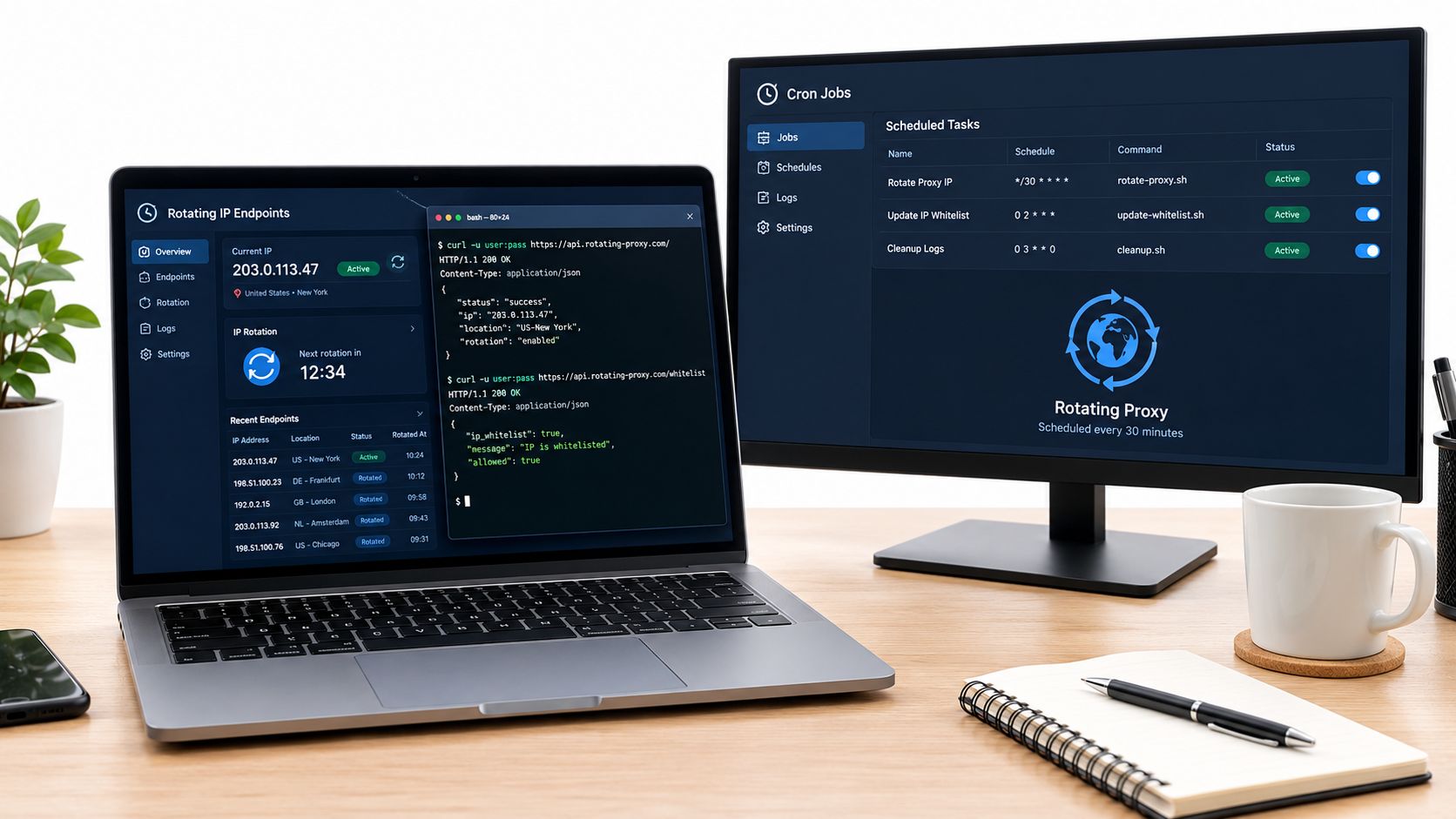
A scheduled job makes sense when each request is logically separate, such as checking public pages across locations. It shouldn't interrupt an authenticated sequence. Request a new sticky identifier through the provider's rotation mechanism, then verify the observed public IP and ASN before continuing.
SESSION_ID="$(date +%s)"
curl --user "$PROXY_USER:$PROXY_PASS"
--proxy "PROVIDER_ENDPOINT?session=$SESSION_ID"
"https://target.example/check"
printf '%s %s\n' "$(date -Is)" "$SESSION_ID" >> rotation-events.log
A scheduler can invoke that script at a controlled interval, but the interval should be randomized around a target window rather than exact and repetitive. Regular timing is itself a detectable signal, as proxy rotation guidance explains.
3. Trigger rotation on demand
On-demand rotation is safer when a test case has completed or the controller sees a meaningful risk signal. A provider may expose a rotation link or session-change action. Use that action after a transaction, not halfway through a login or checkout.
curl --fail --user "$PROXY_USER:$PROXY_PASS"
"PROVIDER_ROTATION_ACTION"
curl --user "$PROXY_USER:$PROXY_PASS"
--proxy "PROVIDER_ENDPOINT"
"https://target.example/next-independent-check"
Treat the rotation response as a request, not proof. Verify the public address, ASN, geolocation, DNS behavior, TLS behavior, throughput, and application continuity afterward. A ten-day NAT measurement found that a public IP could remain stable for several hours, so reconnecting doesn't guarantee that the visible address changed. The NAT measurement study supports validating the result empirically.
4. Let the application react to failures
A Python client can preserve a session by default and switch its sticky identifier after a controlled failure. Keep headers stable for the same browser or client identity, avoid randomizing every field, and never use IP changes to evade access controls.
import time import requests
def fetch(url, session_id): proxy = f"http://USER:PASS@PROVIDER_ENDPOINT?session={session_id}" client = requests.Session() client.proxies.update({ "http": proxy, "https": proxy, }) return client.get(url, timeout=30)
session_id = "logical-session-001" response = fetch("https://target.example/check", session_id)
if response.status_code in (403, 429): time.sleep(2) session_id = "logical-session-002" response = fetch("https://target.example/check", session_id)
The example uses a short backoff only to illustrate control flow. A production controller should use exponential backoff, retire an address after repeated failures, and preserve cookies when the workflow requires them. For mobile-specific setup considerations, use this guide to using a proxy on mobile.
Sticky Sessions, ASN Checks, and Protocol Choices
Three controls decide whether rotation is invisible to the application or destructive: protocol fit, session affinity, and network validation.
HTTP and HTTPS proxies work well when the client already understands web requests and needs proxy authentication, redirects, or browser integration. SOCKS5 is a better fit when the application needs connection-level forwarding beyond HTTP semantics. For TLS-heavy destinations, an HTTP CONNECT tunnel can carry encrypted traffic without exposing request content to the proxy, but every extra hop can affect latency. Test DNS handling, authentication, redirects, IPv6 behavior, and certificate negotiation in the actual client, not only in a command-line check.
A sticky session keeps one exit for a defined lease or until termination. A rotating session requests another exit according to a schedule or explicit action. The choice should follow the workflow:
| Workflow | Protocol | Session Mode | ASN Check |
|---|---|---|---|
| Authenticated social management | HTTP or SOCKS5, based on the client | Sticky for the logical session | Confirm carrier ownership and consistency |
| Independent ad verification checks | HTTP or HTTPS | Rotate between completed checks | Validate geography and intended carrier ASN |
| Public-data collection | HTTP or SOCKS5, based on library needs | Controlled rotation with backoff | Watch concentration in one ASN |
| Geo-dependent QA journey | HTTP or SOCKS5, based on the test harness | Sticky until the test case ends | Verify address, ASN, carrier, and location |
| Multi-step retail workflow | HTTP or HTTPS | Sticky through checkout or test completion | Reject unexpected hosting-network exits |
ASN validation catches false assumptions
An IP lookup alone can return the right country while the wrong network announces the address. Check the ASN before a high-value call, especially when the workflow tests advertising, account security, or location-dependent content. A carrier ASN can still have shared history through CGNAT, so ASN validation should be paired with challenge rates, response codes, and session results.
For workflows that depend on continuity, session persistence guidance is more relevant than a simple “rotate every request” setting. IP rotation changes one network variable. It doesn't make a new browser identity, remove cookies, or authorize access to a restricted service.
Hold the IP when the application is proving continuity. Rotate only when the workflow has reached a safe boundary or the evidence says the current exit is causing trouble.
Real-World Session Pitfalls and How to Avoid Them
A social account warm-up can fail without a dramatic outage. The browser logs in through a 4G exit, the rotation timer changes the address during the authenticated workflow, and the carrier assigns an exit that another subscriber has already used for abusive traffic. The platform now sees a new network context, persistent cookies, an unchanged device fingerprint, and a sudden change in behavior. It may challenge the account or terminate the session.
The timer caused the failure, but the underlying mistake was treating the account as a sequence of independent requests. Account state matters more than elapsed time. A warm-up, publishing flow, or account-security check should keep its session affinity until the logical action finishes.
Three failure patterns
- Fingerprint drift: The browser and device remain constant while the network changes repeatedly. That mismatch can look more suspicious than a stable mobile session.
- Cookie desynchronization: A checkout or authenticated request loses continuity when the exit changes. The application may redirect, reject the cart, or request verification again.
- Shared-carrier reputation: A mobile address can look clean in isolation while belonging to a carrier gateway with a history that affects rate limits and challenges.
Use three guardrails. Bind rotation to authenticated events and completed test cases, not to minutes. Preserve browser, device, header, and cookie consistency within a session. Verify the ASN and observed public address before a high-value call, then retire an exit that produces repeated failures instead of cycling it back into the pool.
Troubleshooting Blocks, CAPTCHAs, and Slow Sessions
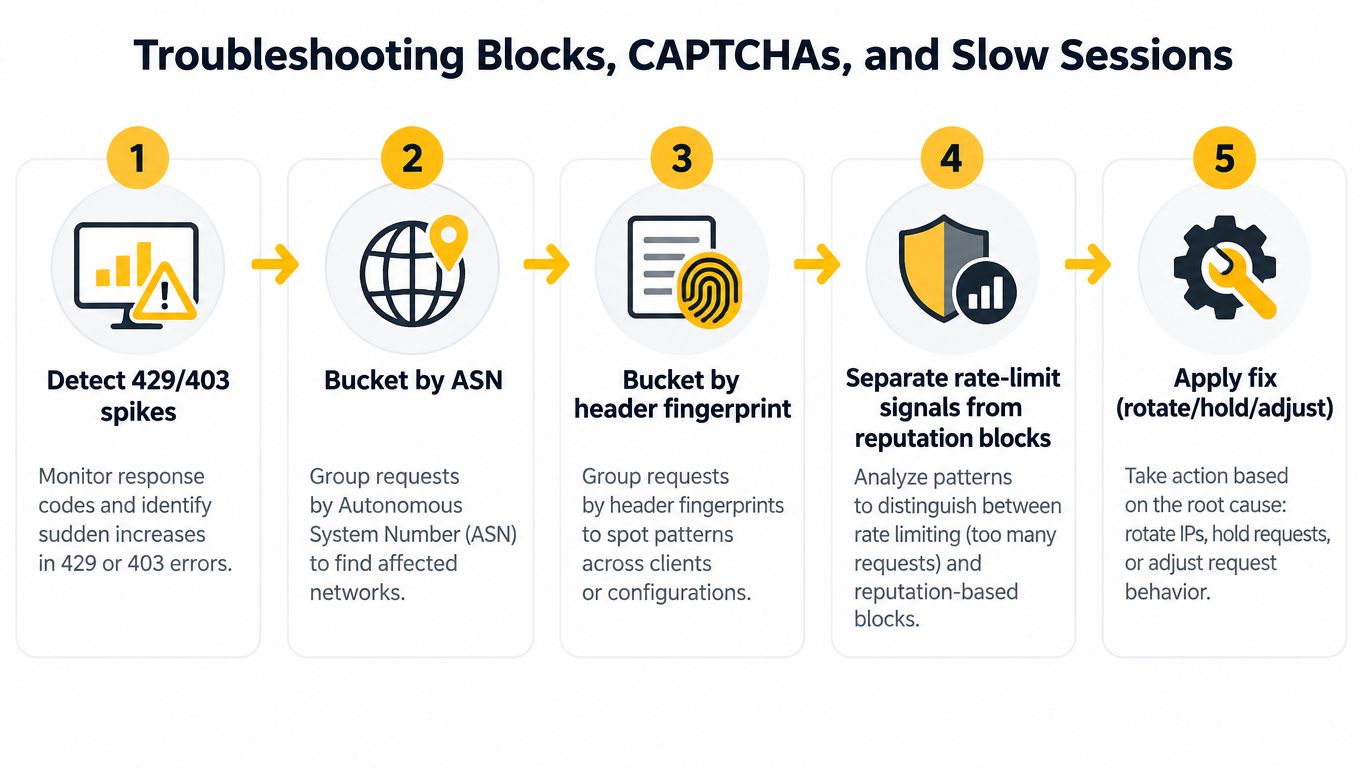
Run diagnostics in a fixed order. Start with 429 and 403 spikes, then group the events by ASN, session, destination, and header fingerprint. If failures cluster by ASN while the client fingerprint stays stable, reputation or carrier history may be the stronger explanation. If they follow one header profile across several exits, inspect client consistency and request behavior first.
CAPTCHA surges deserve the same separation. A mobile CGNAT pool can inherit a poor reputation from other users, but rapid request bursts and inconsistent browser signals can create the same symptom. Compare several carrier exits, reduce request velocity, preserve session state, and record the result by destination rather than labeling the entire pool unusable.
A practical diagnostic sequence
- Detect the response change: Log 403, 429, CAPTCHA pages, response size, and latency.
- Bucket by ASN: Separate carrier exits from hosting or unexpected networks.
- Bucket by fingerprint: Compare headers, cookies, TLS behavior, and browser state.
- Separate causes: Distinguish rate pressure from reputation or session inconsistency.
- Apply one fix: Hold, rotate, back off, change session mode, or retire the exit.
For slow sessions, compare time to first byte through the proxy with a direct baseline for the same authorized destination. Check retransmits, connection reuse, DNS resolution, IPv6 behavior, and SOCKS5 configuration. A new IP won't fix a malformed proxy handshake or a DNS leak.
Use thresholds only after establishing your own baseline. The reliable universal response isn't a particular percentage or latency multiplier. It's a logged rule that says what happens after repeated failures, how long an exit stays retired, and when a workflow switches from rotating to sticky mode.
Rotation Policy Checklist and Next Steps
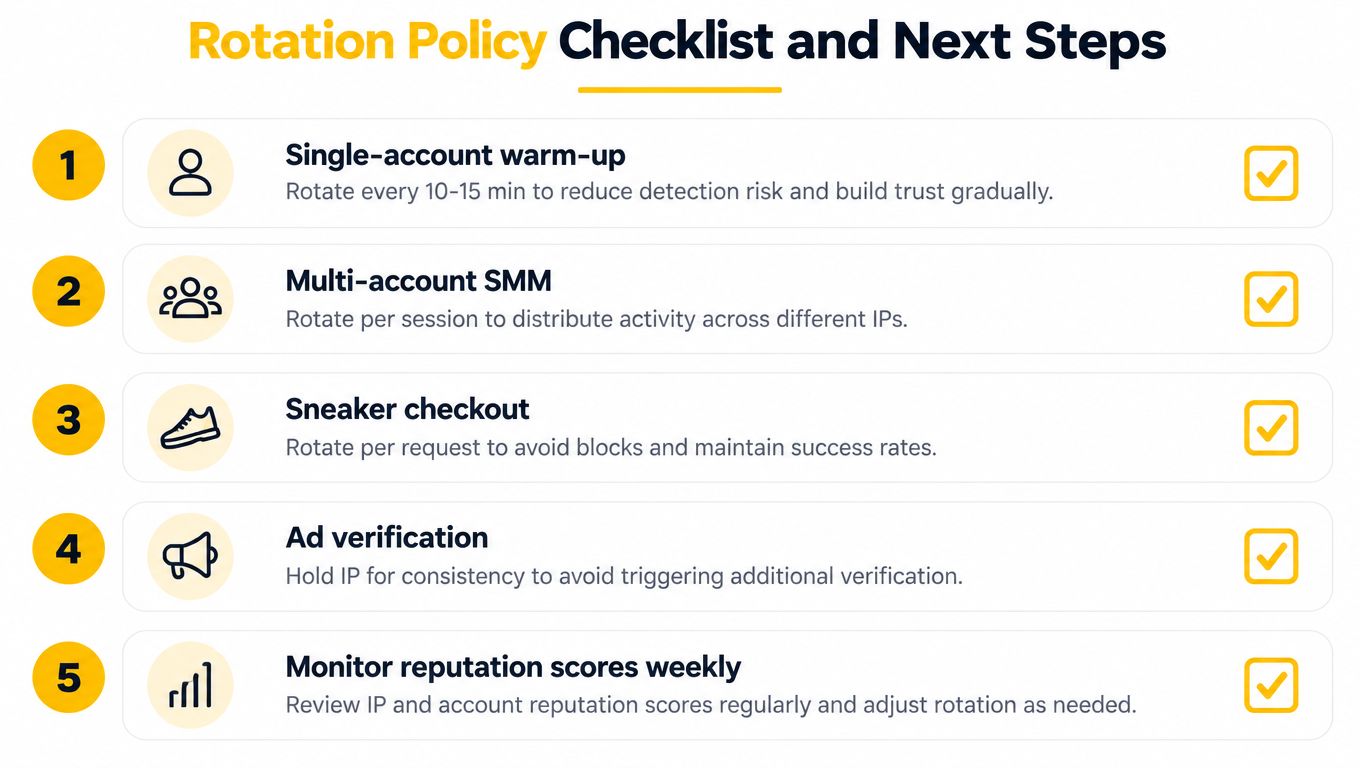
A production rotation policy starts with the workflow. Define when a session begins and ends, which carrier and ASN results are acceptable, what evidence triggers a change, and what happens after repeated failures. Treat rotation as feedback control: observe the destination response, adjust the exit or session mode, then measure the result.
Match the policy to the job
- Single-account warm-up: Keep one address through each authenticated activity block. Rotate at a completed task boundary, never during login or account-security checks.
- Multi-account SMM: Give each account its own logical session. Do not switch exits during an active publishing flow.
- Sneaker or retail checkout: Preserve continuity from cart creation through the authorized checkout test. Per-request rotation breaks stateful transactions.
- Ad verification: Rotate between independent geographic checks, then verify that the address and ASN match the intended market.
- Brand monitoring: Use controlled rotation for separate public observations and back off when a destination signals rate limits.
- SEO rank tracking: Keep request volume conservative, hold client settings steady, and rotate after each location check completes.
Pre-flight checks
Before production traffic, test the provider health endpoint, observed geolocation, ASN and carrier metadata, authentication, IP allowlisting, DNS and IPv6 behavior, and concurrency limits per gateway. With mobile proxies, CGNAT can place many users behind related carrier infrastructure, so an IP change does not guarantee a new network identity. Check the ASN and carrier, not only the address.
Keep part of the pool aside for failed or cooling-down exits. A practical reserve is roughly 30% to 50%, consistent with operational guidance on proxy pool sizing and rotation. Size the reserve against workflow sensitivity and recovery time, rather than applying the same timer to every job.
Log each rotation with its timestamp, workflow and session identifiers, public IP, ASN, carrier, destination, status, CAPTCHA result, latency, and reason. These records show whether the exit, protocol, or policy caused the failure. Use HTTP for straightforward request clients and SOCKS5 when the application needs broader connection-level proxying, then verify DNS handling for the chosen protocol.
Mobile 4G proxies fit workloads needing carrier geography, controlled changes, and stable sessions. Evoproxy provides personal and shared mobile ports, scheduled or on-demand IP changes, and French 4G/LTE/3G connectivity for social management, ad verification, market research, and geo-dependent QA.
For SMM, ad verification, SEO monitoring, or QA, choose sticky mobile sessions or on-demand changes at completed task boundaries. Review Evoproxy for options matching your session and geography requirements.


