Your social media accounts are getting flagged even though the content and login process look normal. At the same time, a developer on your team is watching a product site slow down as visitors arrive, while an ad verification report shows a different result from what a real user sees. These problems can all involve proxies, but they don't involve the same kind.
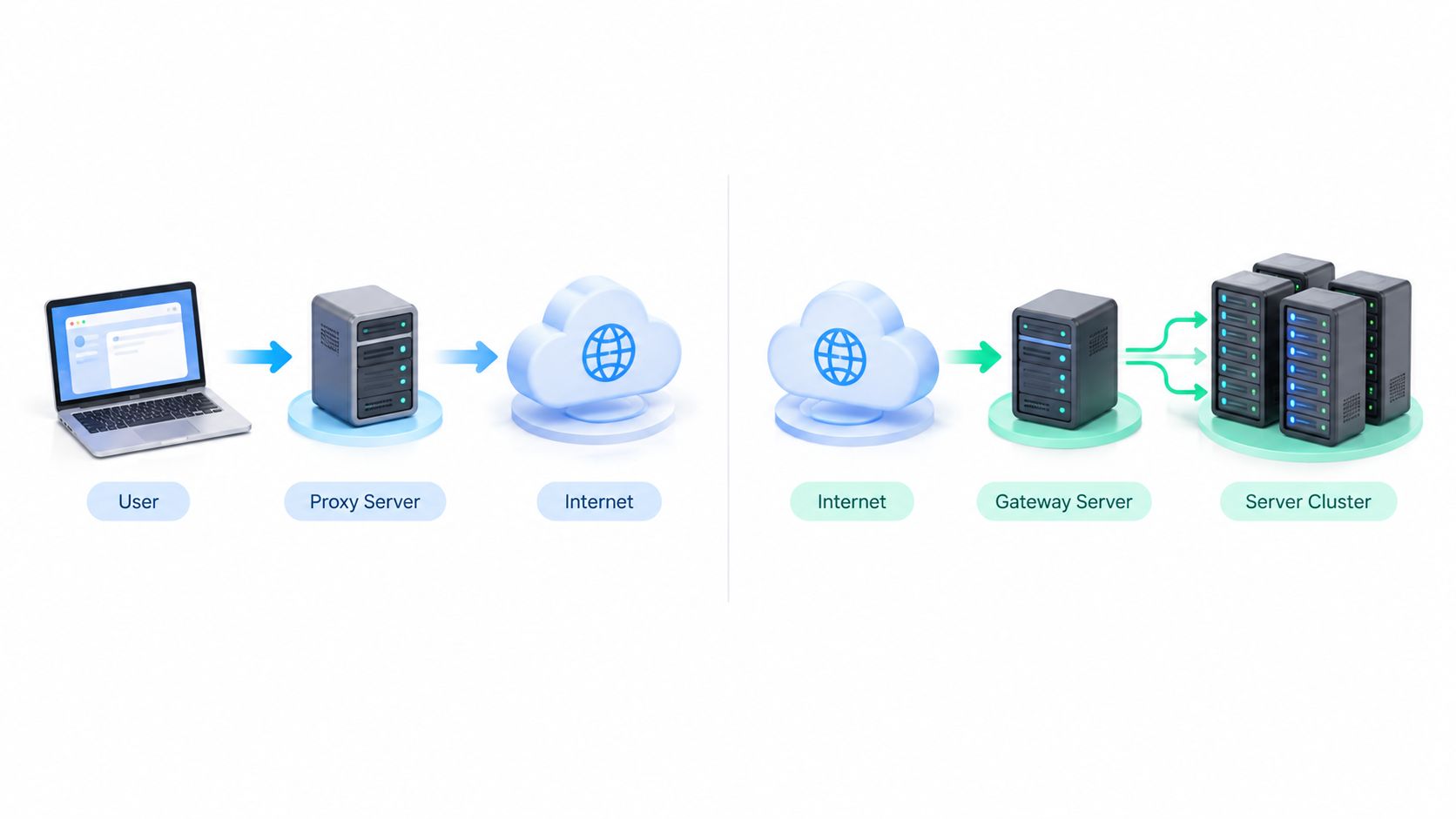
The difference between a forward and reverse proxy comes down to whose traffic the intermediary represents. A forward proxy represents the client and manages outbound requests. A reverse proxy represents the service and manages inbound requests. The distinction sounds simple, yet it determines who chooses the destination, who controls the visible network identity, and which operational metrics matter.
A useful rule is this: use a forward proxy when you control the client and need to control egress. Use a reverse proxy when you control the service and need to control ingress. The sections below apply that rule to social media operations, ad verification, research, QA, and web infrastructure.
Why These Two Proxy Directions Trip Up Smart Teams
Proxy direction is often overlooked until something behaves strangely. A social media manager may need several compliant account workspaces to appear from appropriate network contexts. An ad verification specialist may see a campaign from one region but not another. A developer may put a gateway in front of an application and call it a “proxy” without deciding whether the gateway represents visitors or servers.
That last point causes much of the confusion. Both proxy types sit between two parties, relay requests, and can affect what each side sees. The diagram looks similar, but the trust boundary and decision-maker are opposite.
Start with the destination decision
In a forward-proxy design, the client chooses the origin server. Your browser, scraper, testing script, or automation client decides which website or API to contact, then sends the request through an intermediary. In a reverse-proxy design, the proxy or service owner chooses the origin server after receiving a request for a public service, as explained in this architectural explanation of forward and reverse proxies.
That distinction maps directly to daily work:
- If your team is deciding which external website to reach, you're thinking about a forward proxy.
- If your team is deciding which backend should handle an incoming visitor, you're thinking about a reverse proxy.
A mobile proxy used by an outbound research client is therefore a forward-proxy use case. A website gateway distributing visitors across application servers is a reverse-proxy use case.
Practical rule: Ask whose identity the proxy represents. If it represents your application or device, think forward. If it represents your website or backend service, think reverse.
This article is a decision tool, not a naming exercise. Once you identify the side that needs policy control, the appropriate proxy direction usually becomes clear.
Defining Each Proxy Direction Without the Jargon
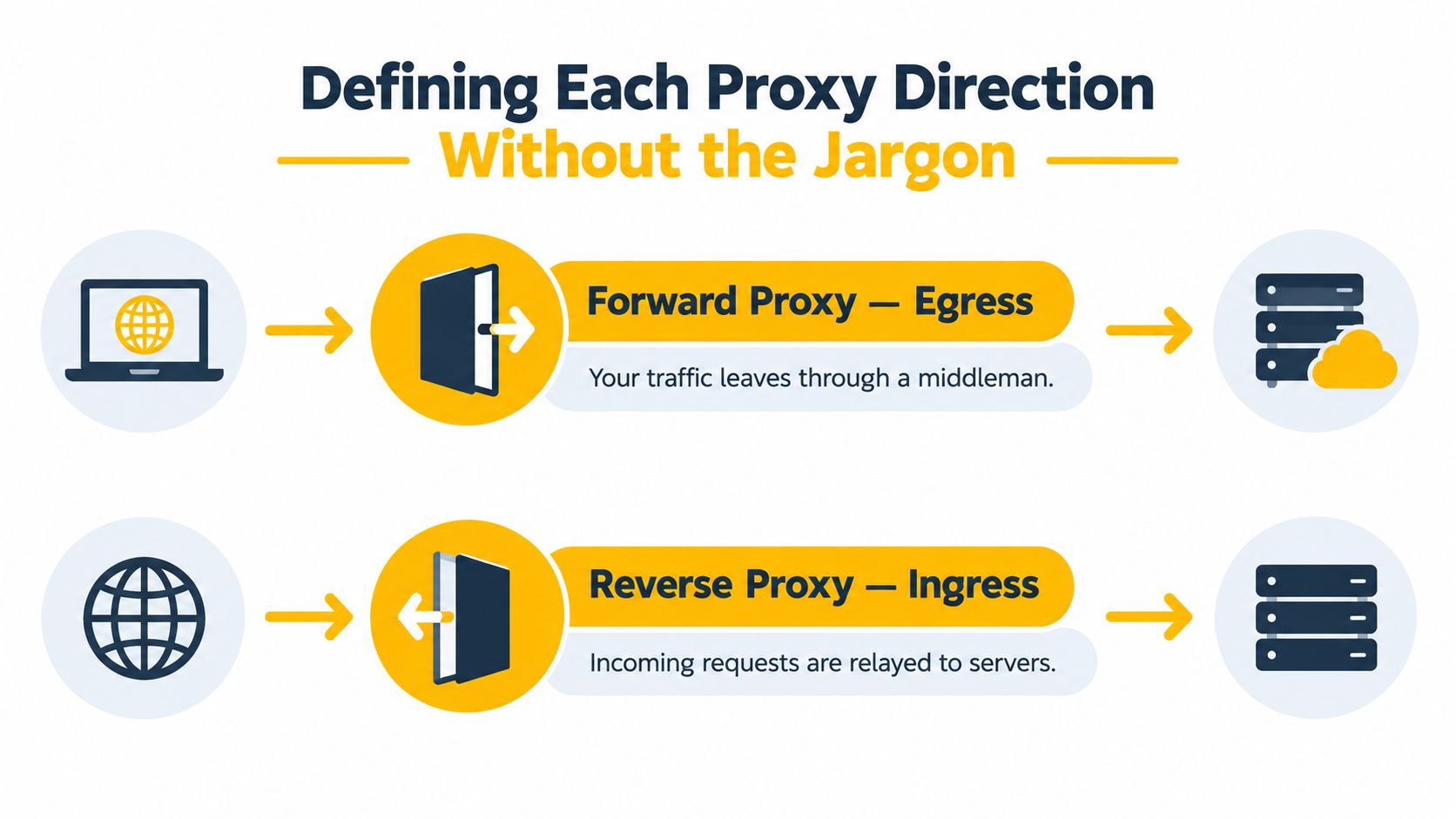
A growth marketer checks a competitor's site through a mobile connection. The browser sends the request to a forward proxy, which then contacts the chosen website. The website generally sees the proxy's address, not the team's office connection. The client decides the destination, while the proxy handles the outbound route.
That model fits employee browsing, scraping, ad verification, and location testing. A company can filter destinations, enforce outbound access rules, record requests, or provide a shared internet exit. A social media manager or research application can select a mobile 4G proxy so an external site receives a carrier-associated address. The proxy represents the requesting browser, device, or application.
A reverse proxy makes the opposite operational choice. A visitor connects to a public website address, and the reverse proxy decides which origin server should handle the request. The visitor does not select or see that backend. The proxy represents the website and its infrastructure.
That arrangement lets a site distribute visitors across application servers, terminate TLS, cache responses, apply authentication, or limit direct exposure of the origin. An ad verifier using a mobile forward proxy is choosing where to go and how the request exits. A reverse proxy in front of the verified website is receiving that visit and choosing how the service responds. The distinction is summarized in Mozilla's guide to proxy servers and tunneling.
Protocols don't determine direction
HTTP, HTTPS, and SOCKS describe the transport method, not the proxy's responsibility. The HTTP CONNECT method can ask a forward proxy to create a tunnel for encrypted traffic, without requiring the proxy to inspect the application data inside it.
Browser settings can distinguish HTTP, HTTPS over TLS, SOCKS5, and SOCKS4, as shown in Mozilla's proxy configuration reference. SOCKS5 operates at a broader connection layer and can suit applications needing wider TCP support. Changing the protocol does not change the direction. If the client still chooses the external destination, the proxy remains forward.
Side-by-Side Comparison of Forward and Reverse Proxies
The most reliable comparison uses five questions: where does the proxy sit, which way does traffic travel, who configures it, what job does it perform, and what does a normal deployment look like?
A forward proxy sits on the client side of the relationship. The client deliberately routes requests through it, either through application settings, device policy, or network enforcement. The destination sees the proxy's apparent source, which makes outbound policy, auditing, filtering, and egress management possible.
A reverse proxy sits on the service side. Clients reach a public endpoint, and the proxy forwards requests to one or more origin servers. The proxy can make routing decisions, handle TLS, buffer requests, cache content, and restrict direct exposure of backend infrastructure.
| Criterion | Forward Proxy | Reverse Proxy |
|---|---|---|
| Represents | The requesting client, user, application, or device | The destination service and its origin servers |
| Network position | Between clients and external destinations | In front of one or more origin servers |
| Traffic direction | Outbound traffic from clients | Inbound traffic to services |
| Who configures it | The client, IT team, application owner, or network administrator | The website, platform, or infrastructure owner |
| Primary jobs | Egress control, filtering, auditing, source masking, and outbound policy | Load balancing, TLS termination, caching, authentication, and origin protection |
| Visible identity | The destination generally sees the proxy instead of the client source | The client sees the proxy as the public service entry point |
| Typical example | A research client reaching external websites through a mobile network | A web gateway distributing visitors across application servers |
The metrics also change with the direction. Forward proxies are evaluated through destination access, policy coverage, connection reliability, source-network quality, and client-side behavior. Reverse proxies are evaluated through request throughput, latency, backend utilization, connection limits, cache behavior, and failure handling.
Cloudflare's application security discussion illustrates why the two models shouldn't be measured as if they were competing versions of the same product. A forward proxy primarily controls outbound traffic from clients. A reverse proxy controls inbound traffic to services. They solve different operational problems and scale against different constraints.
Real Workflows That Need Each Proxy Direction
A proxy direction becomes easier to choose when you start with the work rather than the network diagram. Ask whether your team is reaching an external service or publishing a service for other people to reach.
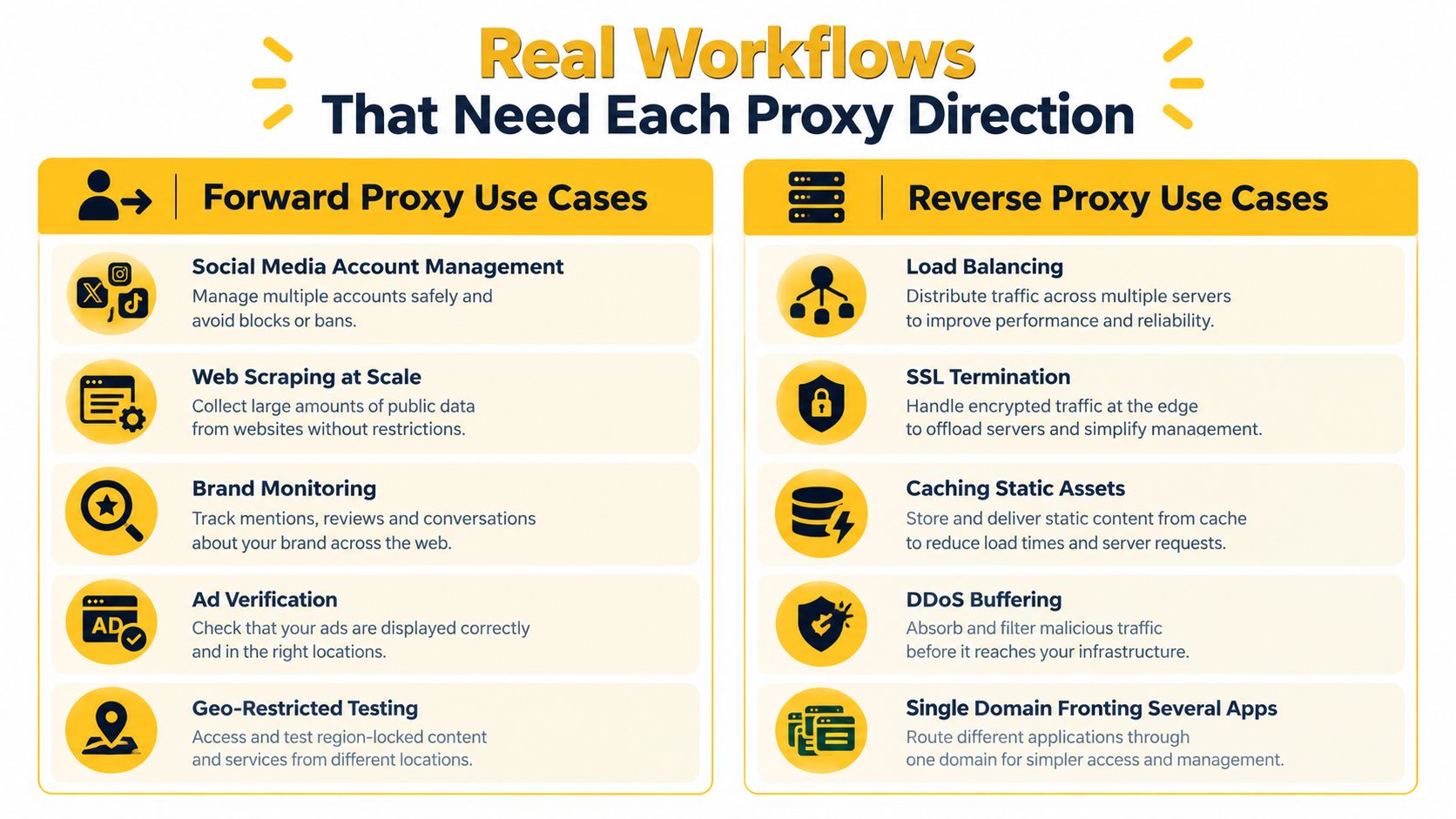
Five outbound workflows
Multi-account social media management typically needs a forward proxy. Each compliant account workspace or approved automation client makes outbound connections to an external platform. A reverse proxy in front of your own dashboard might improve your internal application, but it won't change how that dashboard's outbound requests appear to the destination platform.
Ad verification also uses a forward proxy. The verifier needs to request a landing page, ad result, or campaign experience from a location and network context relevant to the test. The objective is to observe what an external service returns to a client, not to distribute visitors across your own servers.
Price and SEO monitoring follows the same pattern. A research client sends requests to external sites, then records prices, rankings, snippets, or availability for an authorized monitoring purpose. Use rate controls, respect access policies, and keep the collection scope proportional to the business question.
Brand protection can involve a forward proxy when a team checks public listings, impersonation pages, or regional storefronts from different locations. The proxy changes the outbound path for the monitoring client. It doesn't grant permission to access restricted material or bypass a site's rules.
Geo-dependent QA testing is another forward-proxy workflow. A tester can validate regional redirects, localized content, currency presentation, or a location-sensitive checkout flow from an appropriate test environment. A reverse proxy would help the application owner route incoming testers, but it wouldn't make the tester's request originate from the required external network context.
Five inbound infrastructure workflows
Reverse proxies serve the opposite side of these jobs:
- Load balancing sends visitors to suitable application servers.
- TLS termination centralizes encrypted connection handling at the public edge.
- Caching serves reusable content without involving the origin for every request.
- Traffic buffering helps protect backends from uneven client speeds and sudden demand.
- Application fronting exposes one public domain while routing requests to several internal services.
If your team is building an outbound workflow, an API proxy service belongs in the forward-proxy discussion. If your team owns the destination application, reverse-proxy architecture is the relevant model.
Mobile Residential and Datacenter Proxies as Forward Proxy Flavors
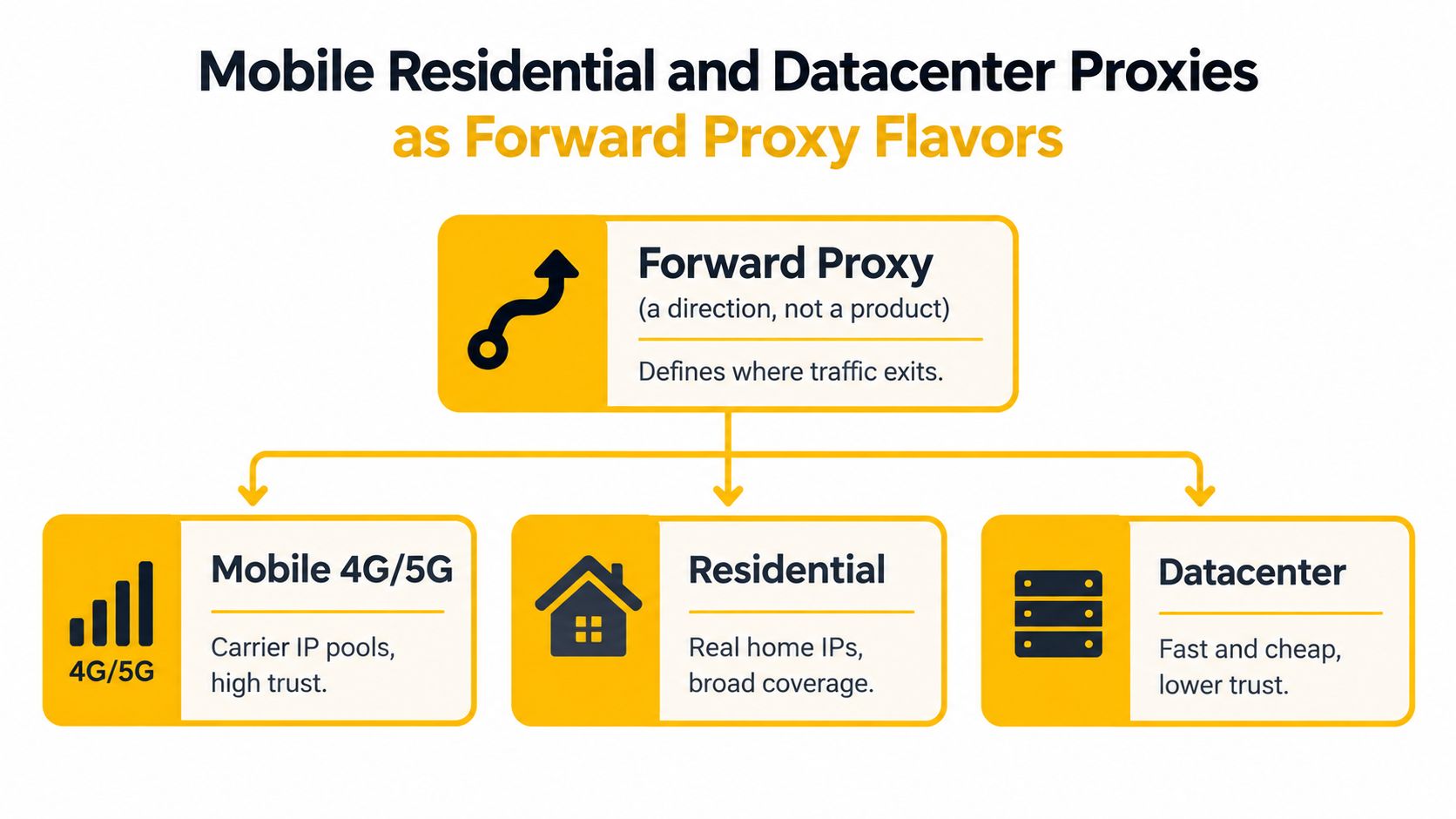
A forward proxy is a direction, not a product category. Once you've decided that the client needs controlled outbound traffic, you still need to choose the network behind the exit address. Mobile 4G/5G, residential, and datacenter proxies are all forward-proxy flavors when a client uses them to reach external destinations.
What the destination can infer
A datacenter proxy usually belongs to a hosting or cloud-provider ASN. An ASN, or Autonomous System Number, identifies a network operating under a common routing policy. That network ownership signal can influence fraud scoring, rate controls, ad-verification results, and geo-dependent QA. RIPE NCC's database documentation explains that IP and ASN information can support IP geolocation, although an ASN isn't a precise statement of where a user is physically located.
Residential proxies are associated more closely with home internet service networks. Mobile proxies are associated with telecommunications networks and carrier infrastructure. That difference matters because a mobile address can resemble ordinary subscriber traffic rather than a cloud-hosted server connection, which can make mobile 4G IPs harder for destinations to fingerprint and block. “Harder” isn't the same as invisible, and network quality, behavior, authentication, and compliance still matter.
Carrier-grade NAT, or CGN, adds another important detail. The IETF's discussion of provider NAT and address sharing explains that a provider can assign private subscriber addresses while sharing a smaller pool of public IPv4 addresses among multiple subscribers. A mobile network's public IP may therefore represent many unrelated devices. An IP alone isn't a complete identity signal, and attribution can be harder than with a cloud-hosted datacenter address.
Rotation versus continuity
IP rotation changes the exit address according to a schedule or an on-demand trigger. It can help a legitimate research or QA workflow test multiple network contexts, but rotation should match the application and the site's access rules. Constantly changing identity during one authenticated workflow can create more anomalies than it solves.
A sticky session keeps the same exit path for a defined session or task. That matters when a login, cart, browser state, or multi-step test must remain coherent. Choose rotation for separate observations and sticky sessions for continuity.
For regional research, verify both apparent geography and ASN. A changing address inside the same carrier ASN may rotate the IP without changing the visible network category. Switching to a cloud ASN changes a more obvious classification signal. Evoproxy describes mobile proxy use and carrier-based connectivity in its mobile proxy guide, but any provider should be evaluated against your specific workflow, authorization, and logging requirements.
Why Reverse Proxies Are Not Automatically Secure
Calling a reverse proxy “security” and a forward proxy “privacy” is too loose to guide a production decision. A reverse proxy can hide backend topology, terminate TLS, apply authentication, cache content, and filter requests. It also becomes part of the application's trust boundary when it rewrites headers, passes identity information to the origin, or hands authentication results to backend services.
That creates responsibility, not automatic protection. The service owner must authenticate the proxy-to-origin connection, validate forwarded headers, restrict direct origin access to trusted proxy networks, and monitor both proxy and backend behavior. A reverse proxy should not be treated as a complete firewall, a point reinforced by proxy security guidance on the limits of both directions.
The forward-proxy side has gaps too
A forward proxy only governs clients that use it. An unmanaged device can connect directly. An application can ignore system proxy settings. Other channels can bypass the intended route. The proxy also doesn't automatically protect the client from malware, data leakage, or a compromised intermediary.
Treat the proxy as one layer in a broader control system:
- Authenticate proxy-to-origin traffic so a backend can distinguish trusted gateway requests.
- Validate forwarded identity headers instead of accepting client-supplied values blindly.
- Restrict origin exposure so the public internet can't bypass the reverse proxy.
- Log both identities carefully, including the original client context and the proxy-generated connection context.
- Monitor latency and failures at the proxy and origin rather than assuming a successful connection means a healthy service.
A forward proxy also requires trust. It can see or influence traffic according to its configuration and the protocols it handles, so credentials, sensitive data, and access permissions need appropriate protection. For teams implementing encrypted forwarding, a proxy server with SSL can be part of the design, but it doesn't remove the need for endpoint security or authorization controls.

Security principle: Choose the proxy direction according to the side that needs policy control. Use forward proxies for egress governance and reverse proxies for ingress management and origin protection.
Minimal Configuration Examples for Both Directions
The configuration should make the direction visible. A forward client sends outbound requests to an intermediary. A reverse gateway receives public requests, then routes them to an internal application.
For a social media manager or ad verifier using a mobile 4G endpoint, the client selects the destination and supplies the proxy settings:
import requests

proxies = {
    "http": "http://USER:PASSWORD@MOBILE_PROXY_ENDPOINT:PORT",
    "https": "http://USER:PASSWORD@MOBILE_PROXY_ENDPOINT:PORT",
}

response = requests.get(
    "https://example.test/region-check",
    proxies=proxies,
    timeout=30,
)
The proxies object applies the intermediary to outbound HTTP and HTTPS requests. The client still chooses the destination. Store credentials and endpoints in secured configuration rather than source control, and test only authorized targets.
A website operator configures the reverse direction at the gateway:
upstream application_pool {
    server app_a;
    server app_b;
}

server {
    listen 443 ssl;
    server_name example.test;

    location / {
        proxy_pass http://application_pool;
        proxy_set_header Host $host;
        proxy_set_header X-Forwarded-For $proxy_add_x_forwarded_for;
    }
}
Here, upstream lists backend choices. proxy_pass routes incoming requests, while proxy_set_header Host preserves the requested host for application routing. The forwarded-for header carries client context, so the application should trust it only through an approved proxy path.
Protocol and direction are separate decisions. A browser or request library may use HTTP, HTTPS over TLS, SOCKS5, or SOCKS4. Nothing in either block names the protocol direction. Placement determines direction, so the same request library or nginx binary can serve either side.
Choosing the Right Proxy Direction for Your Work
Use one question before choosing a product, protocol, or IP pool:
Do I control the client making the request, or do I control the service receiving it?
If you control the client, choose a forward proxy when you need to govern outbound connections. That covers a social media manager coordinating approved account workspaces, an ad verification specialist checking regional delivery, a research team observing localized prices, and a QA engineer testing geo-dependent behavior.
If you control the service, choose a reverse proxy when you need to govern inbound connections. That covers routing visitors across application servers, centralizing TLS handling, caching repeatable responses, applying authentication before the application, and keeping origin infrastructure behind a public gateway.
Match the network to the workflow
For outbound work, the network type affects what destinations can infer:
- Mobile 4G/5G suits tests and research where carrier-network context matters.
- Residential suits workflows that require home-network classification and broad regional coverage.
- Datacenter suits controlled environments where speed and predictable infrastructure matter more than subscriber-like network signals.
Then decide whether the task needs rotation or continuity. Use rotation for separate observations across network contexts. Use sticky sessions when a browser, login, cart, or multi-step QA flow must retain a consistent path. Check the apparent location and ASN instead of trusting a country label alone.
A reverse proxy won't anonymize a visitor from the website being accessed. It represents the website to visitors and hides the site's origin infrastructure, not the visitor's identity from that website. Likewise, a mobile forward proxy doesn't replace authorization, rate controls, endpoint security, or lawful-use safeguards.
For social media management, market research, ad verification, and geo-sensitive QA, a mobile 4G forward proxy is the relevant direction when the client needs a carrier-associated outbound path. Keep the workflow compliant, document why each network context is needed, and measure successful task completion rather than chasing an abstract anonymity label.
Evoproxy provides mobile 4G connectivity with personal and shared ports, configurable rotation, and access to mobile IP addresses for outbound workflows. If your team needs to test a carrier-network path for social, research, advertising, or QA work, visit Evoproxy and choose a setup that matches the session and compliance requirements of your use case.


